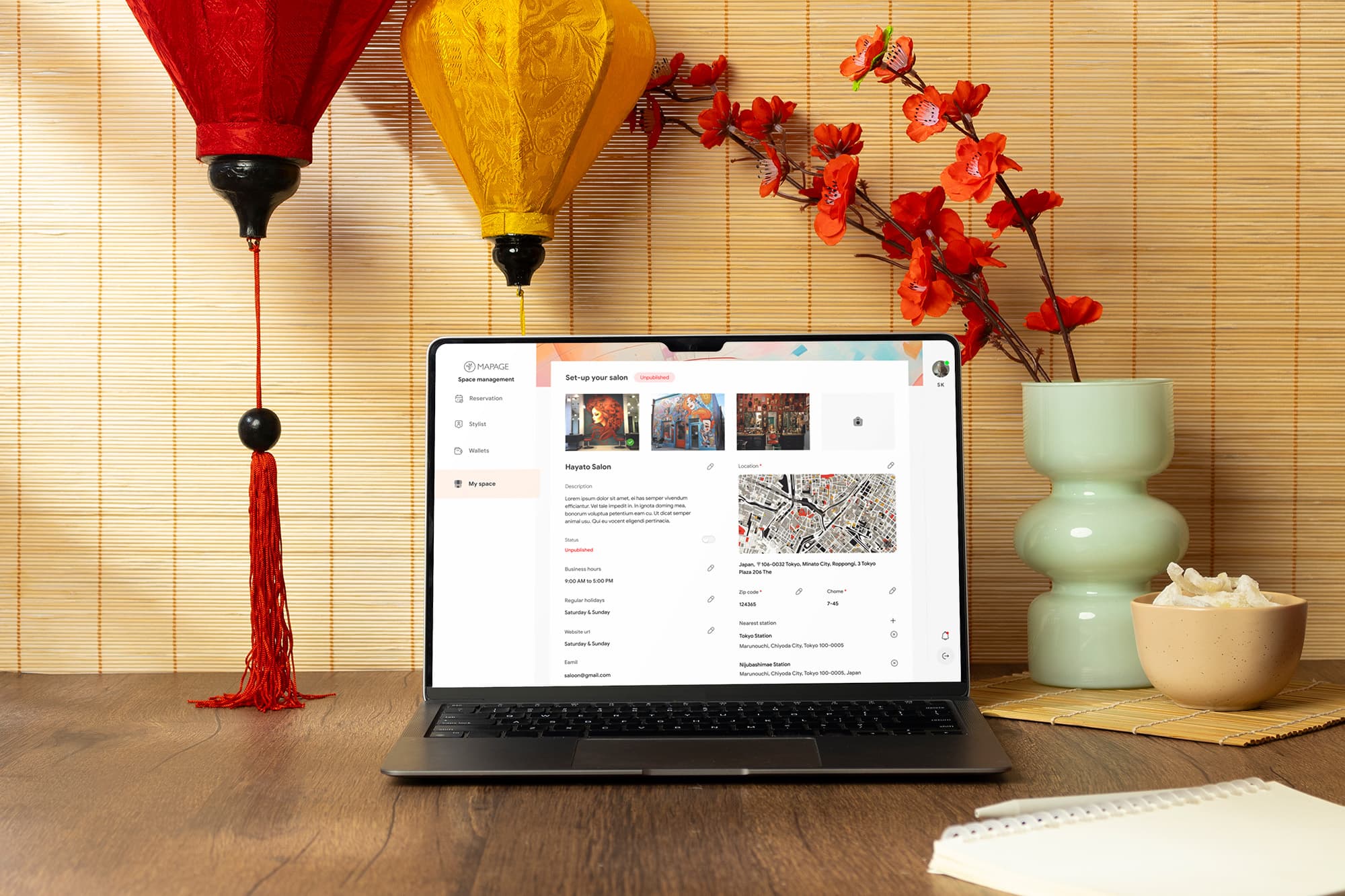
Mapage is a Japan-based SaaS platform that connects customers with beauty salons and stylists for appointments. It empowers salon owners to manage their entire operation, staff scheduling, bookings, and revenue distribution, from one centralized platform.
Product URL
mapage.net
I was brought in as the lead designer from the agency side, responsible for driving the entire design process on behalf of the client. My role wasn't just execution, it was translating a complex operational domain into a structured, scalable design language, while navigating cross-cultural collaboration between our team and Japanese stakeholders.
End-to-End Ownership: Managed every stage of design lifecycle, from synthesizing research inputs and mapping user flows to delivering high-fidelity screens and a developer-ready design system.
Research Synthesis: The Japanese team provided deep domain research, user interviews, competitor analysis, and cultural guidelines. I translated those inputs into UX decisions, ensuring every design choice was grounded in validated user needs, not assumptions.
System Thinking: Designed platform's Information Architecture and component library from scratch, building a scalable foundation that the engineering team could implement consistently and extend over time.
Cross-Cultural Collaboration: Acted as design bridge between the agency and the Japanese client team, aligning on flows, validating cultural appropriateness, and communicating design rationale clearly across both sides.
A Production-Ready Design System: Delivered a complete component library, buttons, form fields, tab states, spacing rules, with full documentation. The engineering team could build without ambiguity.
Zero-to-One Platform Architecture: Designed entire platform from scratch, IA, user flows, wireframes, and high-fidelity UI, giving Mapage a scalable web foundation that didn't exist before.
Cross-Cultural Design Precision: Integrated Japanese UX norms, typography, and culturally validated layouts from day one, not as an afterthought.
Onboarding Flow Built for Non-Technical Owners: The guided blank state and sequential setup flow were specifically designed so a solo salon owner with no SaaS experience could complete setup without hand-holding.
Developer-Ready Handoff: Delivered annotated screens, component states, and interaction notes, minimizing design debt and reducing back-and-forth during implementation.
In Japan's highly competitive salon industry, owners were operating a genuinely complex business through a patchwork of disconnected tools. Multiple freelance stylists, seat-based booking models, and manual profit-sharing arrangements, none of it was unified. The result was Operational Fragmentation: scheduling conflicts, payment delays, and zero visibility into stylist performance or earnings.
What made this uniquely hard wasn't the feature list, it was the density. Salon owners needed to manage staff availability, booking slots, payment collection, and profit distribution simultaneously, all while running a physical business. Existing tools addressed one layer at a time. None handled the full stack.
We didn't just need a booking calendar with extra features, we needed to design a first-of-its-kind operations layer on top of an existing mobile ecosystem, built for a market where design missteps aren't just UX failures, they're cultural ones.

For this project, the Japanese team had already conducted thorough, validated research before I was brought in. My job wasn't to gather data, it was to absorb, synthesize, and translate that research into design decisions that actually held up under cultural scrutiny.
This distinction matters. Working from pre-existing research required a different kind of rigor, I had to deeply understand findings I didn't collect myself, across a market I wasn't native to, and make design calls the client's team could trust.
What I received from the Japanese team:
User Interview Findings: Documented pain points and expectations from real salon owners, revealing that manual scheduling and payment distribution were consuming disproportionate time every week.
Competitor & Market Analysis: A benchmarking report on existing salon tools in the Japanese market, identifying where the current landscape was falling short on multi-stylist management and profit distribution.
Cultural Guidelines: Japan-specific UX norms, communication sensibilities, and design expectations, critical inputs that prevented the product from feeling like a Western tool awkwardly localized for a Japanese audience.
What I did with it:
I ran an Affinity Mapping session to organize all inputs into meaningful clusters, moving from raw research data to prioritized design direction. This surfaced three core pain points that became the backbone of every design decision:
Scheduling Fragmentation: no unified view of multi-stylist availability.
Revenue Distribution Friction: profit-sharing was manual, error-prone, and time-consuming.
Onboarding Complexity: first-time digital adopters needed guidance, not a blank screen.


Operations: Salon owners were managing staff across disconnected tools, no single source of truth for bookings, schedules, or payments.
Finance: Profit-sharing with freelance stylists was described as a "painful, manual process" that consumed hours each week, a direct automation opportunity.
Users: Many target owners were first-time SaaS adopters. The setup experience needed to guide them through complexity without exposing it all at once.
The Verdict: The research was already strong. My value was making sure none of it got lost in translation, literally and figuratively, when it became UI.
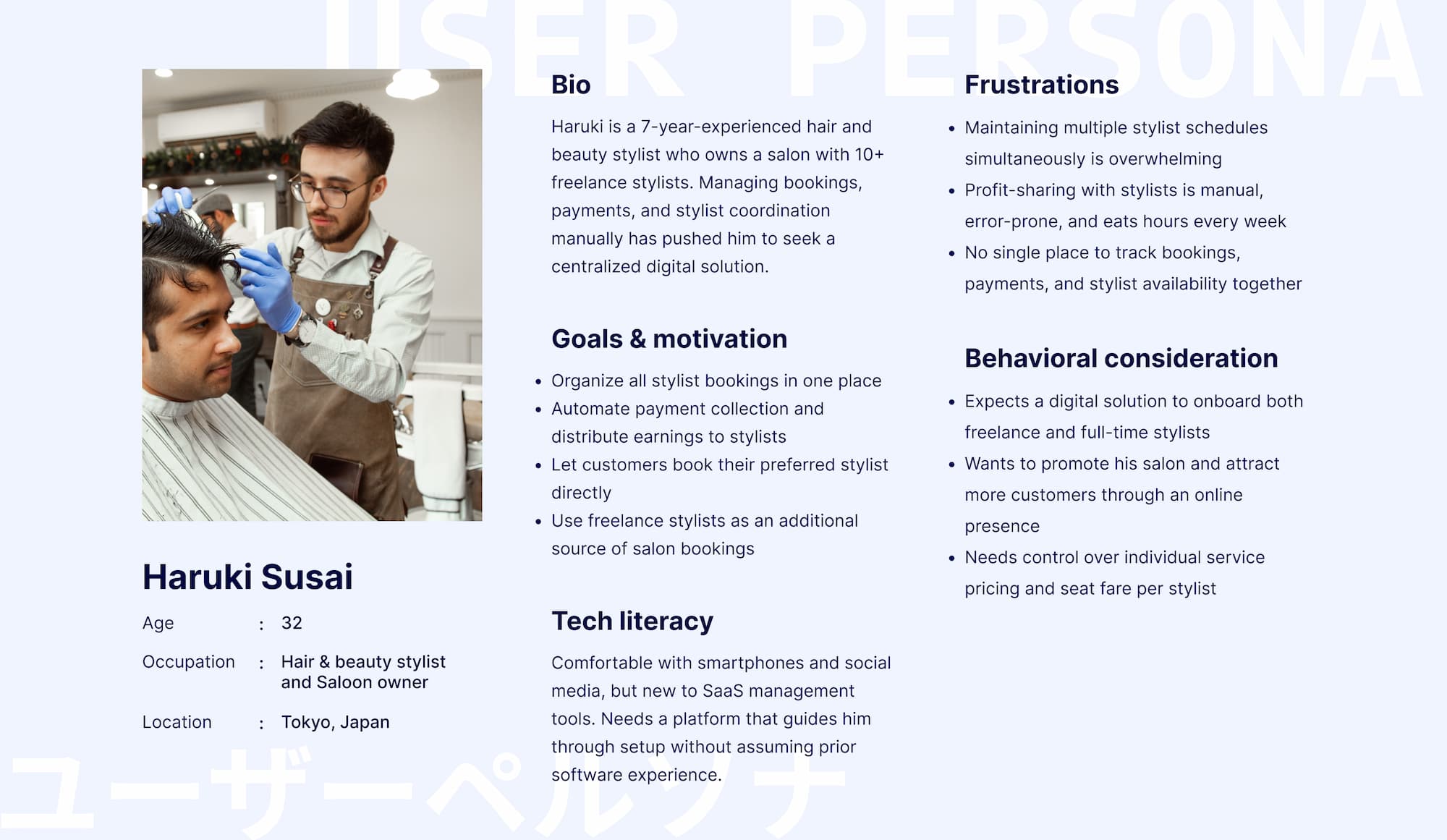
User Persona
The Japanese team's research surfaced a clear primary user: the salon owner who is operationally overwhelmed but digitally motivated. Rather than designing for an abstract user, I built around Haruki, a working stylist-turned-owner managing 10+ freelance staff, where every design decision was tested against one question: does this reduce his operational load, or add to it?
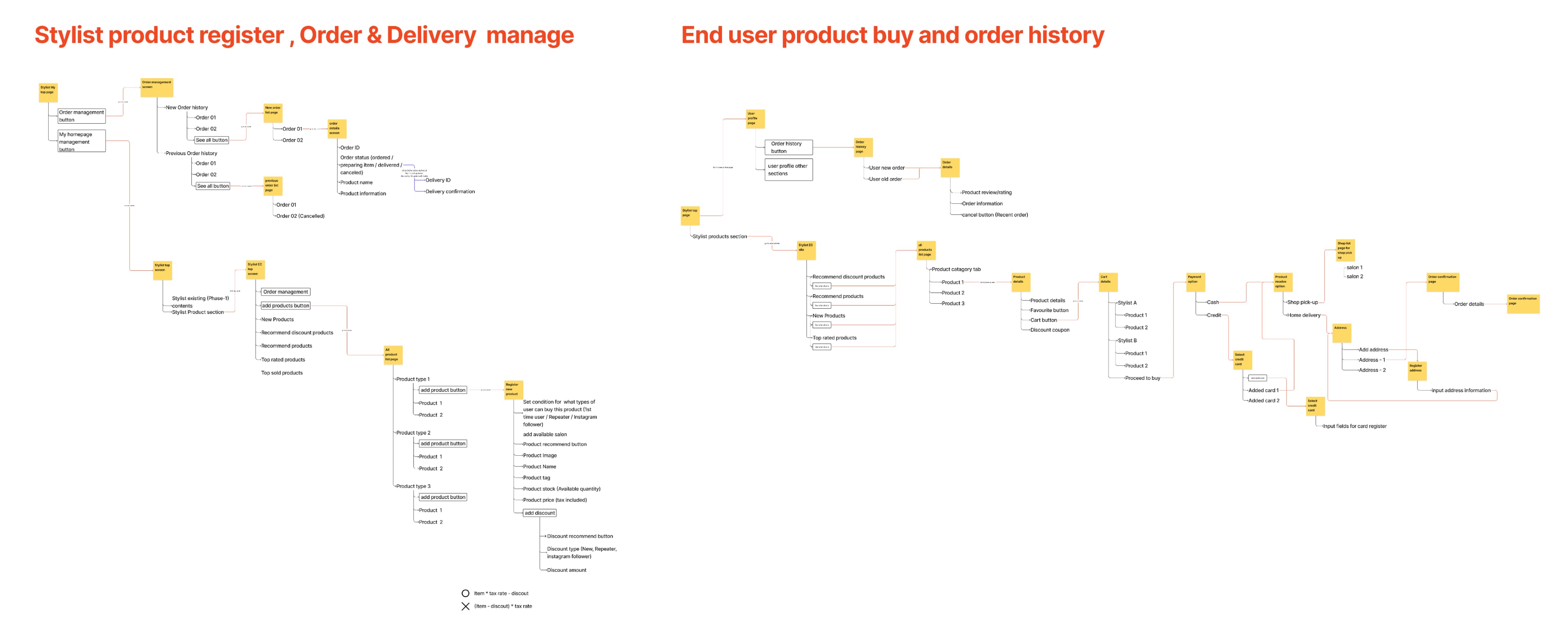
With synthesized research in hand, I moved into the hardest design problem of this project, not what features to include, but in what order to surface them. A salon owner setting up for the first time is dealing with staff, schedules, seat types, and payment simultaneously. My job was to make that feel sequential, not simultaneous.
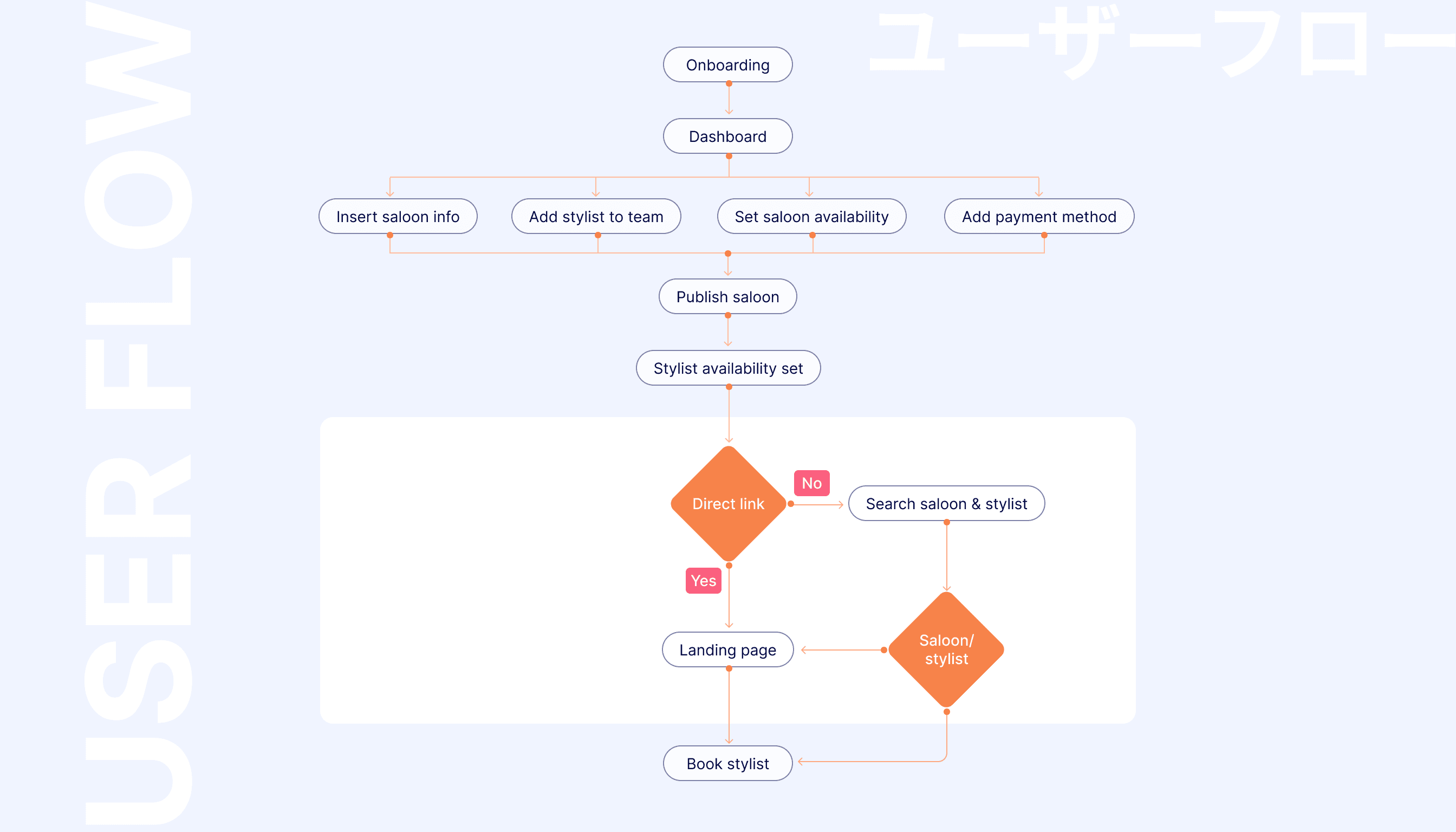
Sequential Onboarding Architecture: I mapped the core owner flow as: Onboarding → Dashboard → Salon Basic Info → Availability Setup → Add Stylists → Payment Method → Publish. Each stage has one clear job. No step asks the owner to context-switch before the previous one is resolved. Applying Hick's Law, I reduced the number of decisions at each screen to the minimum required complexity was absorbed by the architecture, not pushed onto the user.
Availability Before Stylists: A deliberate IA decision. Salon availability, working days, seat types, booking slots, needed to be established before stylists were added. This prevented a common edge case where stylist schedules were set against undefined salon parameters, creating conflicts from day one.
Publish as a Gate, Not a Button: Publishing the salon profile was designed as the natural endpoint of a completed setup, not an action available from the start. This framing kept owners moving through the flow rather than publishing an incomplete profile and causing a poor customer-facing first impression.
Stakeholder Flow Validation: I mapped multiple flow variations before aligning with the tech team and Japanese stakeholders on the optimal path. Decisions like where payment setup sat in the flow, before or after stylist invitations, were resolved at this stage, not during development.
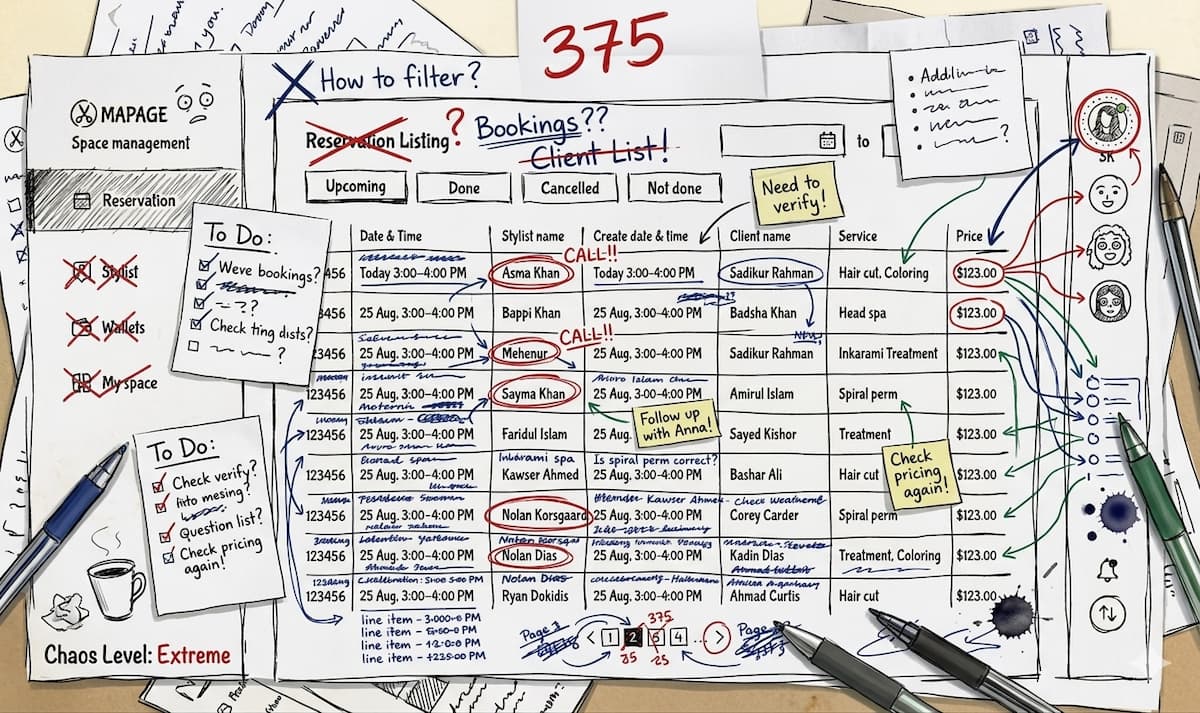
Logic-First Exploration: I started with hand-drawn low-fidelity sketches to pressure-test layout directions without the overhead of high-fidelity details. Complex screens like the Availability Setup, with its seat types, day toggles, time slots, and fare settings, needed structural validation before a single color was chosen.
Blank State as a Design Problem: Low-fidelity wireframing surfaced the most critical UX decision of the project early, the "My Space" blank state. When a salon owner lands on their profile page for the first time, they see nothing. Without intentional design, that's a dead end. By catching this in wireframes, I was able to design a guided empty state with placeholder content before it became a development problem.
Stakeholder Alignment Through Low-Fi: I used mid-fidelity wireframes, not high-fidelity mocks, for client reviews. This kept feedback focused on structure and logic rather than visual preferences, ensuring we only moved to UI once the foundation was solid.
The Verdict: The ideation phase wasn't about generating ideas, it was about making the right structural decisions early enough that the high-fidelity work had nothing to undo.
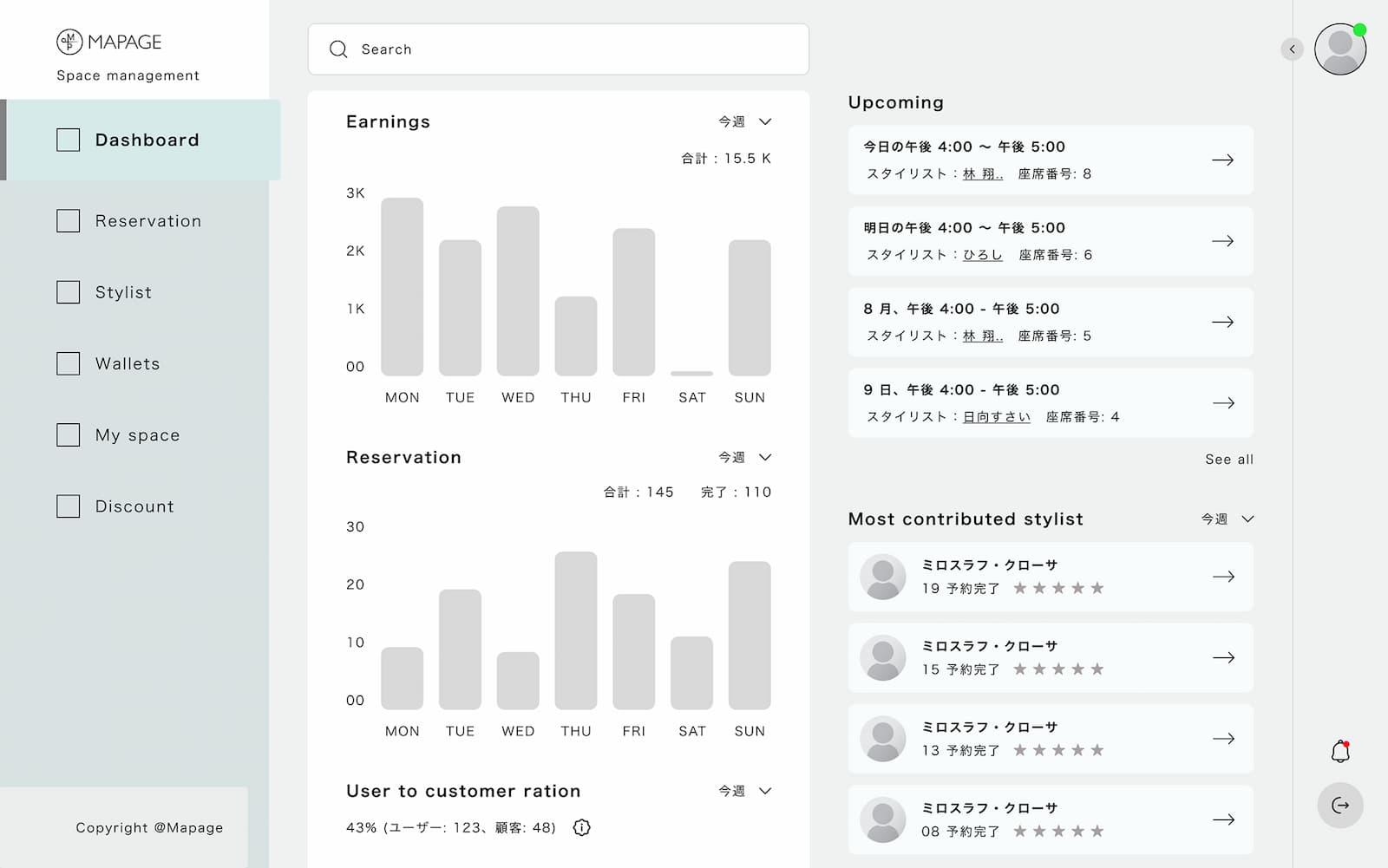
Onboarding: First Impression
A salon owner landing on Mapage for the first time isn't in a patient mood. They're mid-workday, probably just got off a call, and they're giving this platform maybe three minutes before they decide if it's worth their time.
That's the person I was designing for.
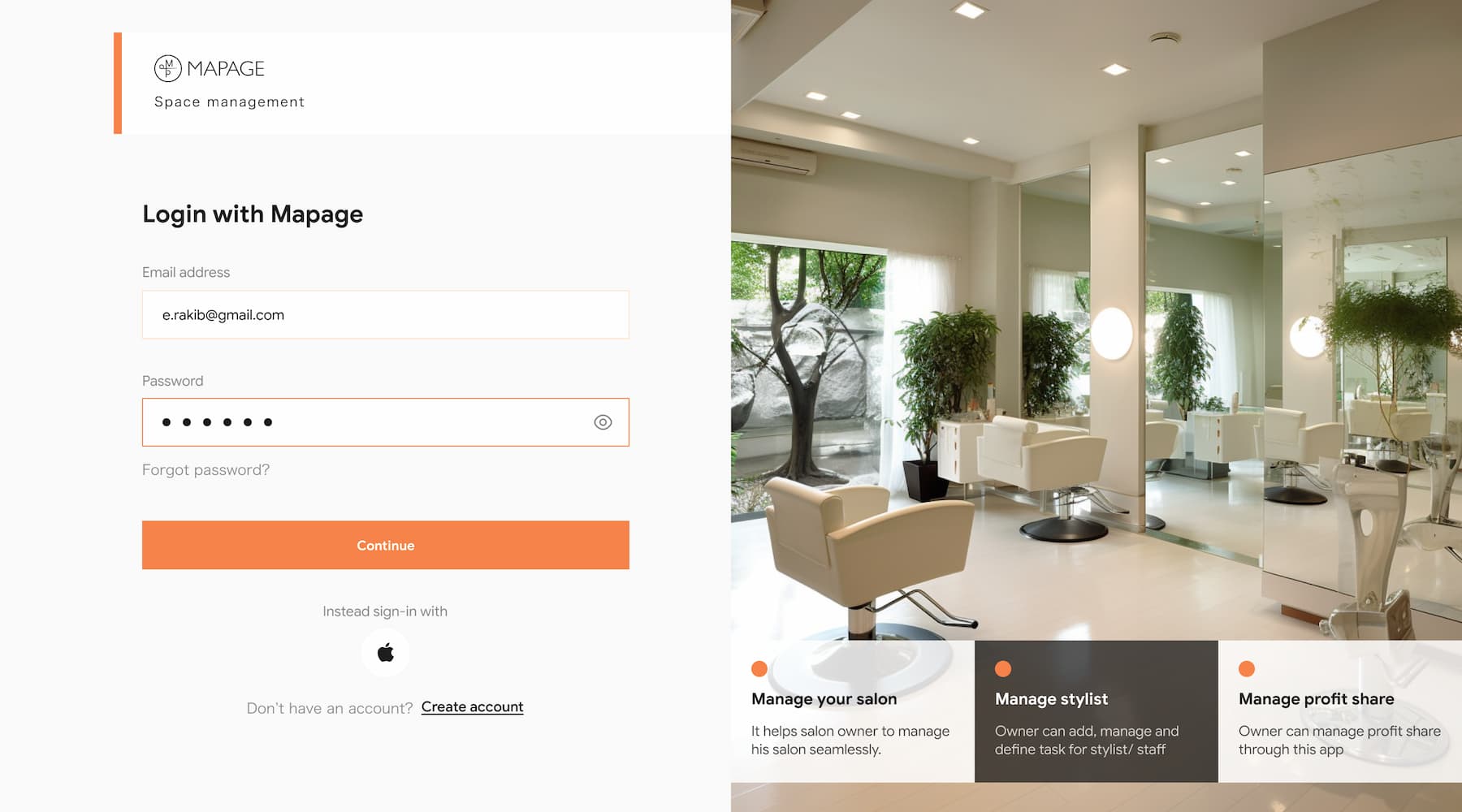
The login screen uses a split layout form on left, salon imagery on the right. But the right side isn't decoration. While the owner fills in their email, they're passively absorbing three things: Manage your salon. Manage stylist. Manage profit share. It's the platform's value proposition delivered without asking them to read a landing page. The form and the pitch happen simultaneously.
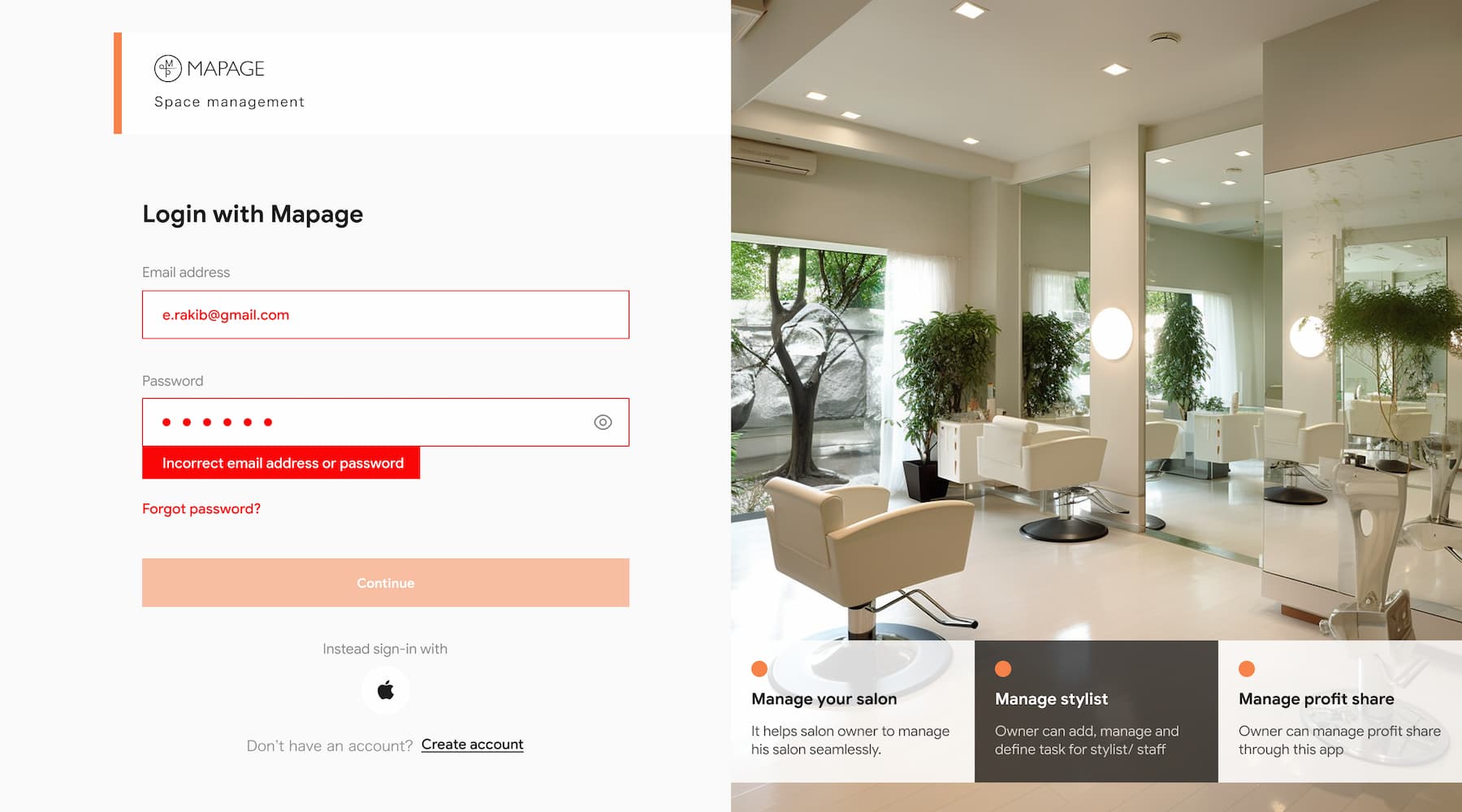
When a user enters the wrong credentials, error appears inline, directly under the field, not at the top of the page, not after a full page reload. The Continue button fades to disabled immediately. The message is plain: Incorrect email address or password. No jargon, no blame, just a clear signal and a path forward with "Forgot password?" already in reach.
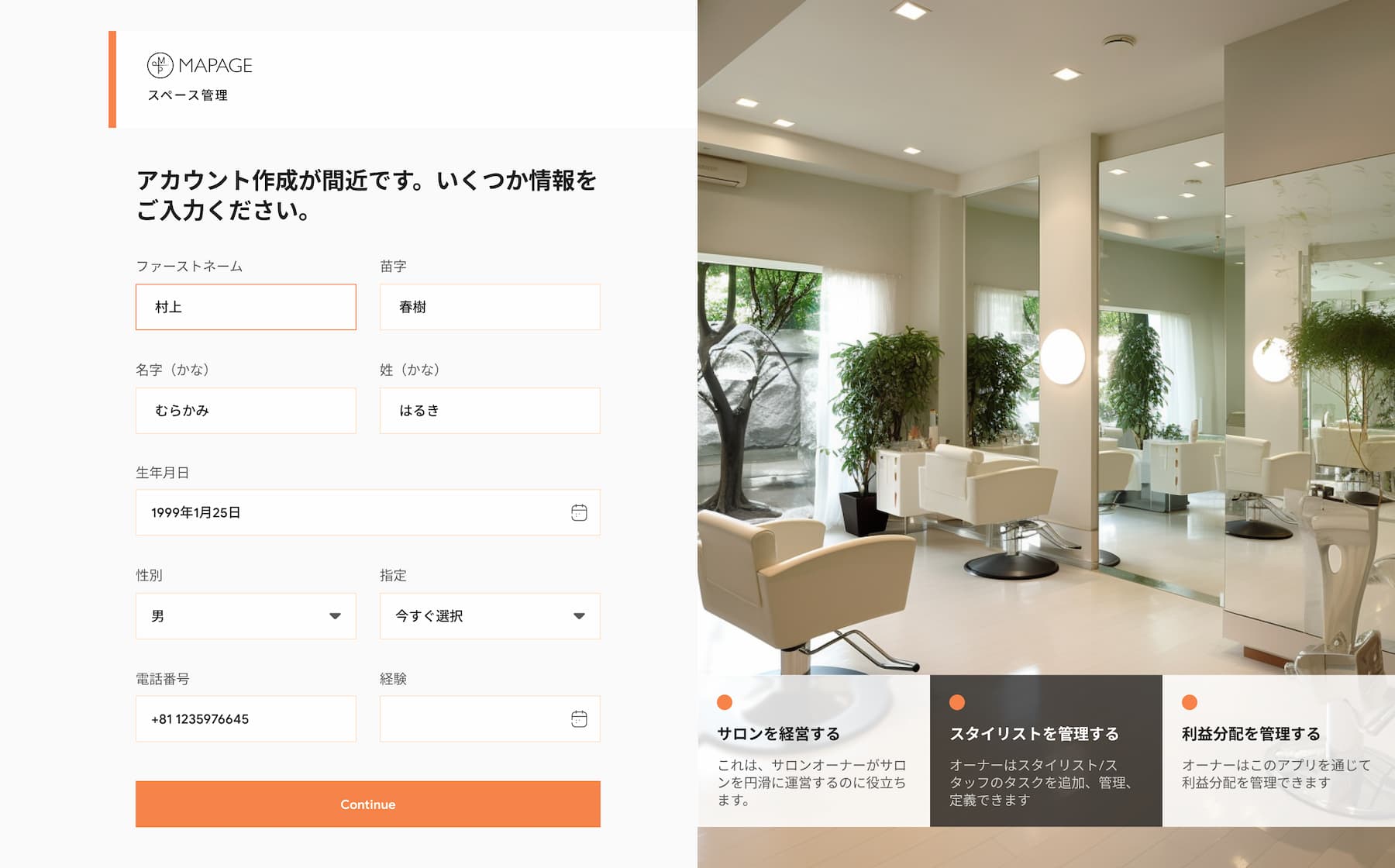
The create account screen collects something most Western SaaS tools skip entirely both kanji and kana readings of the owner's name. In Japan, this isn't optional. It's how identification, payment verification, and formal correspondence work. Building it in from day one rather than retrofitting it later was a deliberate cultural decision, not an afterthought.
The form asks only what's necessary to get started. Nothing more.
Setting Up the Salon Profile
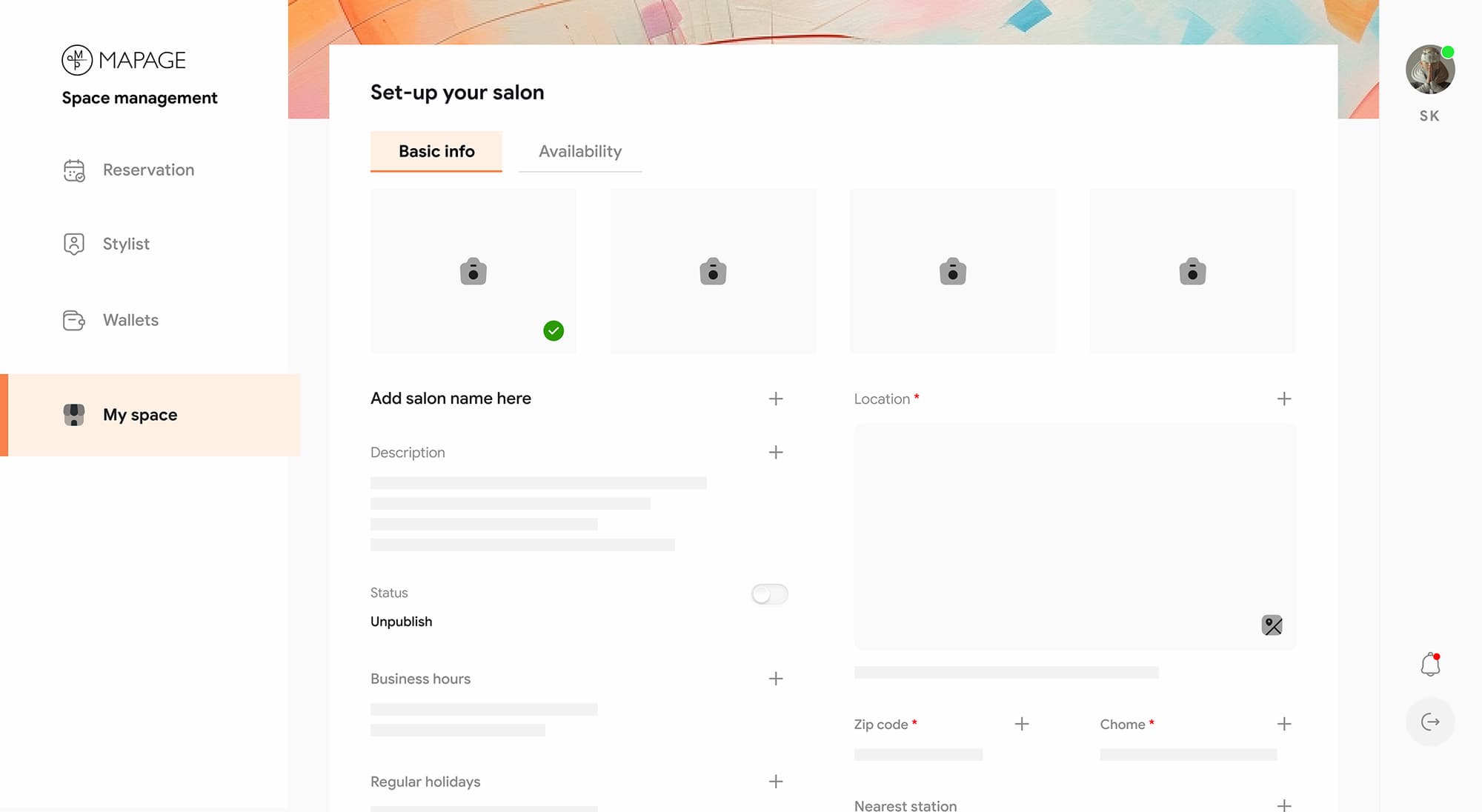
After account creation, the owner lands on My Space, their salon's home on the platform. First visit, it's empty. And that emptiness is intentional.
Placeholder slots and gentle prompts show exactly what goes where, so the structure itself becomes the instruction. Fields expand on demand with a + tap, keeping the screen from feeling overwhelming. When adding a description, a focused overlay pulls attention away from everything else. Not ready? Skip is always there.
The colorful header at the top makes the blank state feel like a beginning, not an absence.
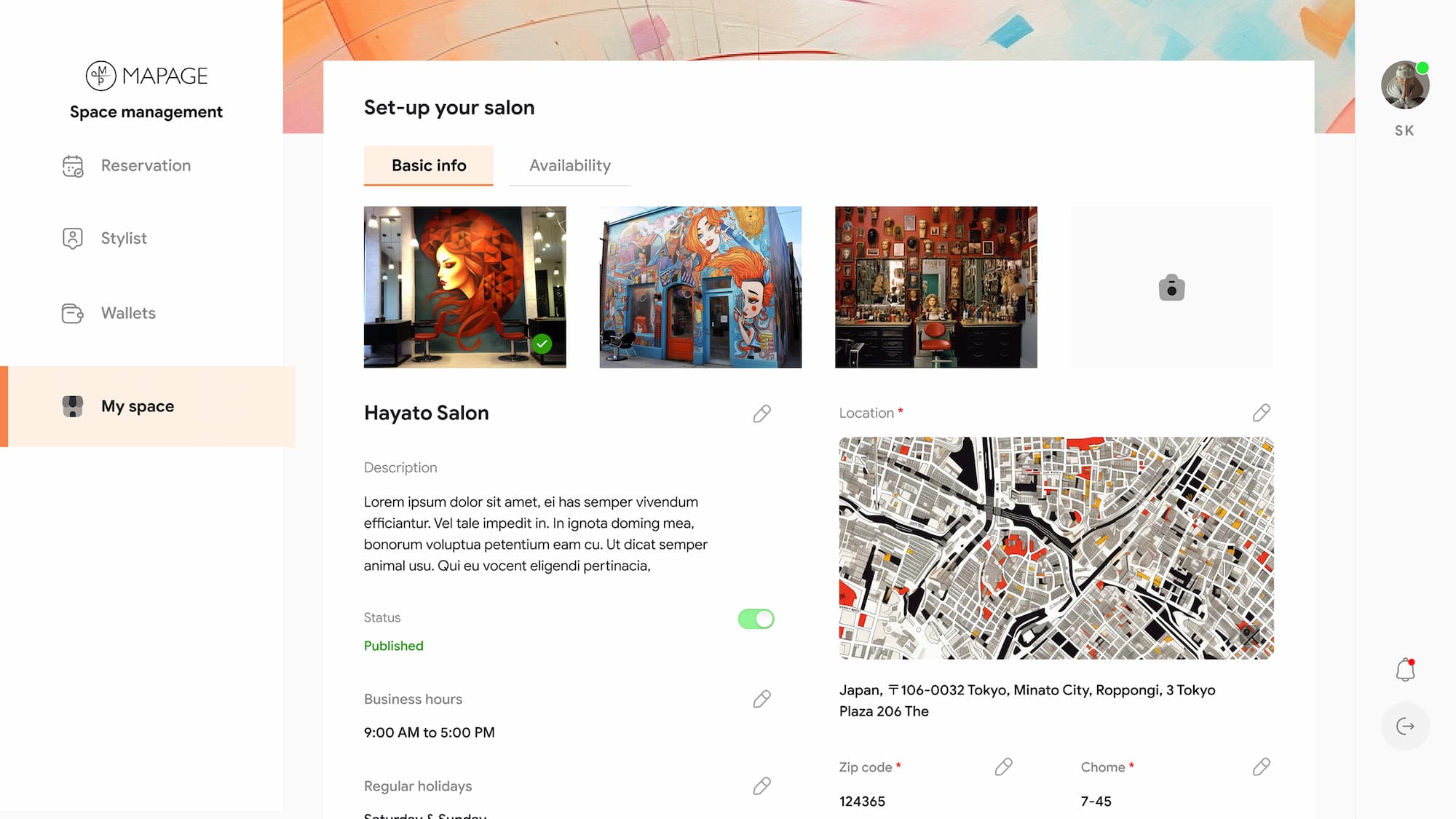
Once filled, the profile comes alive.
The same screen that started empty now tells a complete story salon photos, business hours, location pinned on a real map, nearest transit stations for customers navigating Tokyo. The Unpublished badge at the top is intentional friction: it signals the profile exists but isn't visible to customers yet, giving the owner a moment to review before going live.
The Publish button only appears once the essentials are in place, not a step zero option, but a earned endpoint.
Saloon Availability
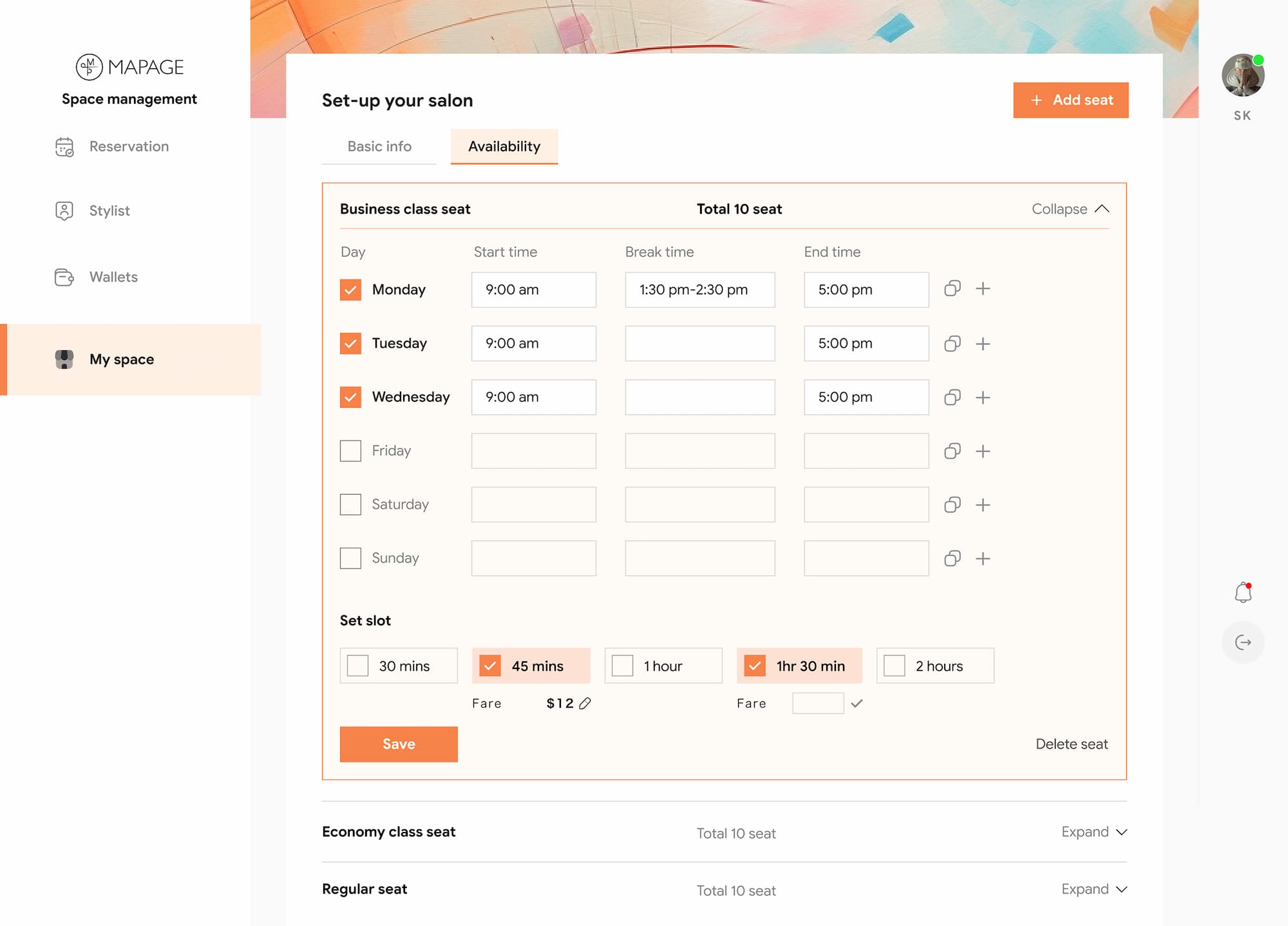
This was the most technically complex screen in the entire platform and the challenge wasn't designing the fields, it was deciding how to present them without overwhelming a salon owner who's never used a SaaS tool before.
The solution was seat-type grouping. Business class, Economy, Regular each collapsed by default, expanded one at a time. The owner configures working days, start and break times, and booking slot durations per seat category. Each time slot carries its own fare, so a 45-minute session and a 90-minute session can be priced independently.
The copy icon on each day row handles a reality most tools ignore most salons run the same hours Monday through Friday. One click duplicates the settings rather than forcing the owner to re-enter the same data five times.
Once availability is saved, the Publish button unlocks. The salon is live, bookings can begin.
Managing the Team
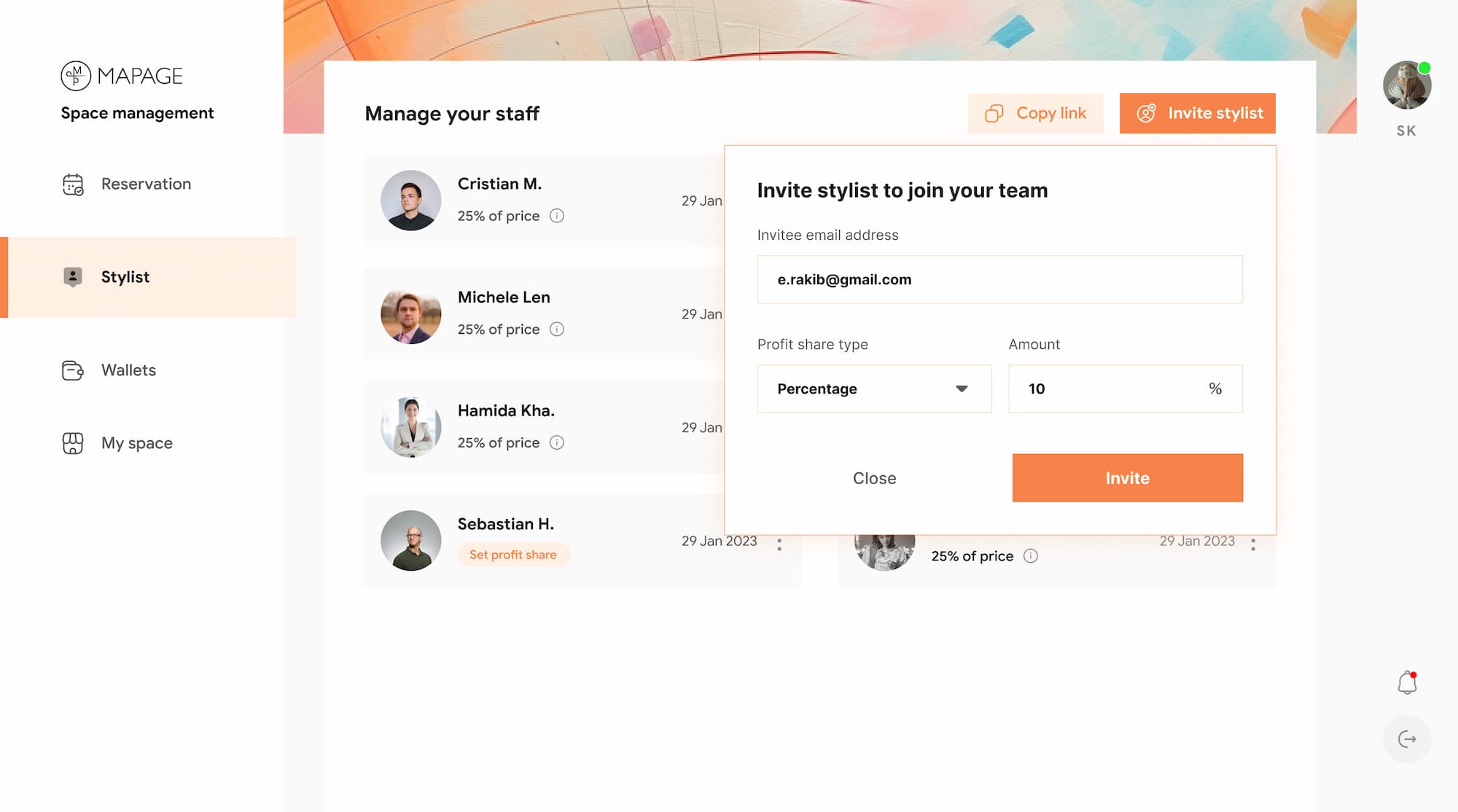
Haruki doesn't just manage a salon, he manages people. The Stylist screen had to make that feel organized, not administrative.
The staff list shows each stylist with their profit share percentage visible at a glance. No digging through settings to remember who gets what. Sebastian's "Set profit share" tag in orange is a quiet but firm nudge, an incomplete team member is immediately visible, not buried.
Inviting a new stylist happens through a focused modal: enter an email, set the profit share type and percentage, hit Invite. The financial agreement is established at the point of invitation, not as a separate step, not as an afterthought. This eliminates the most common source of stylist-owner disputes before it can even start.
For owners who prefer it, Copy link offers an alternative, share the invite without needing the stylist's email on hand.
Reservation Management
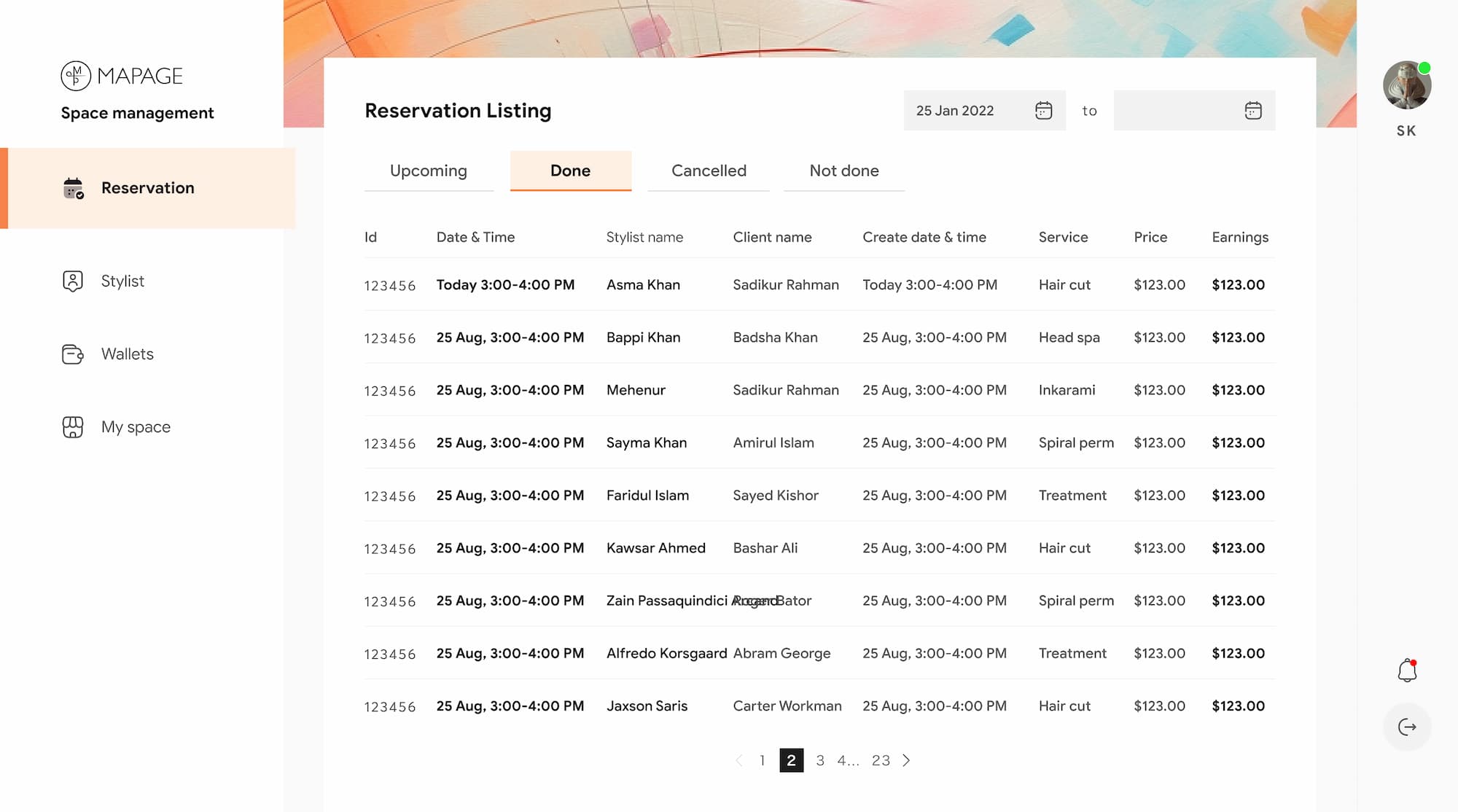
A busy salon can have hundreds of reservations a month. This screen had one job, make sure owner never has to hunt for what they need.
Four tabs handle the full lifecycle: Upcoming, Done, Cancelled, Not done. Each state is one click away, never mixed into a single overwhelming list. The table shows everything that matters at a glance, stylist, client, service, price, and earnings as a separate column, because what a customer pays and what the salon earns aren't always the same number.
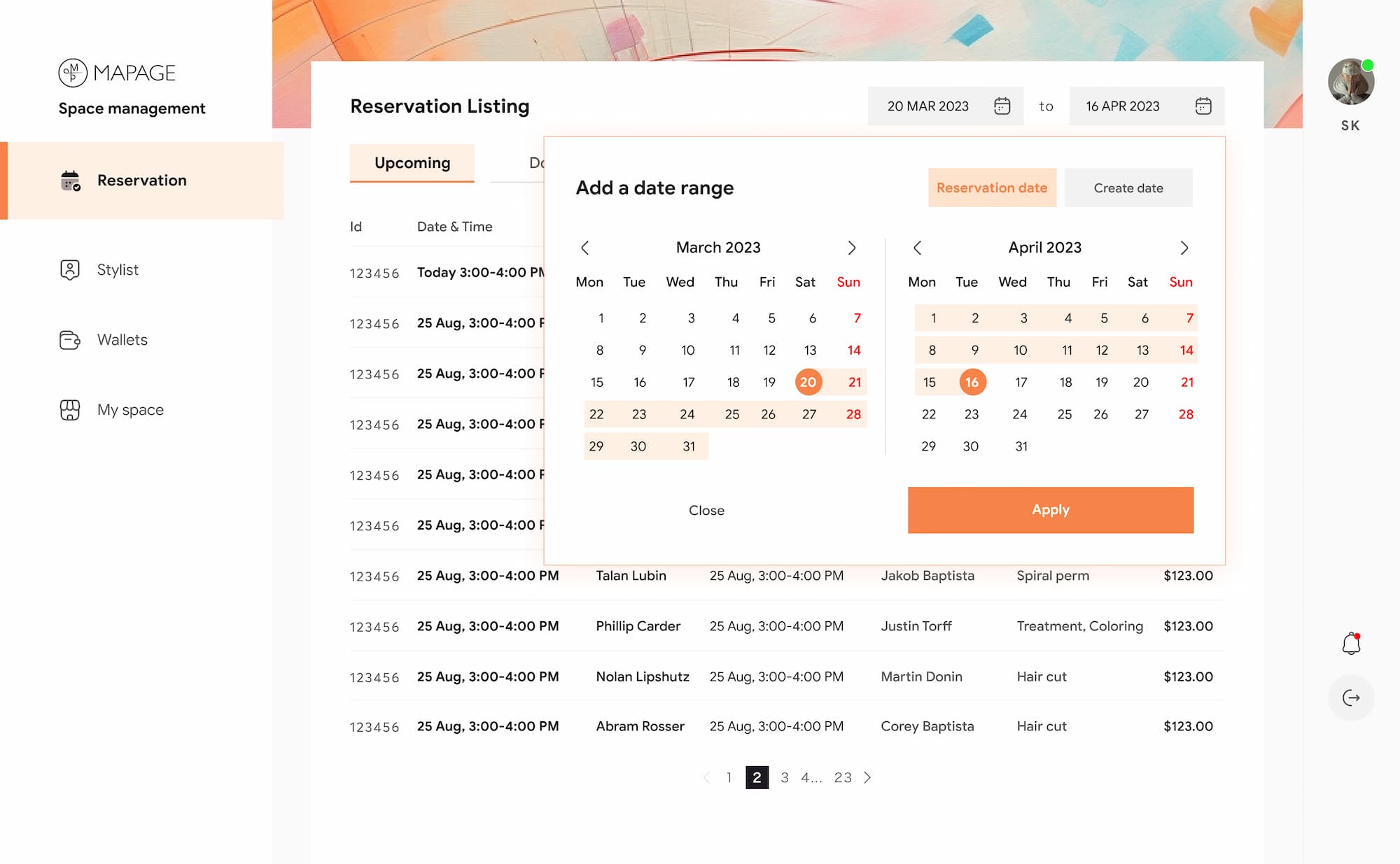
Date filtering goes a step further than a simple search. The dual-month calendar lets owners set a custom range across months, and they can choose to filter by either reservation date or create date, two meaningfully different views. An owner reviewing March revenue needs reservation date. An owner tracking how far in advance customers book needs create date.
Small distinction. Big operational difference.
Wallets & Payment Verification
Getting paid should be the easy part. But in Japan, financial compliance isn't optional, and Stripe's verification requirements are strict. The owner can't receive a single payment until their identity is confirmed.
Rather than dumping all requirements on one screen, the verification is broken into four sequential steps: Name → Address → Bank → ID verification. Each stage has one clear job. Completed steps turn solid orange with a checkmark, progress is always visible, the finish line never feels far.
The ID verification step deserves special mention. The right side of the screen shows the exact document requirements inline — file size, format, image quality, flash rules, so the owner knows what's needed before they attempt an upload. No submission, no rejection, no frustration of starting over.
The Wallets screen itself starts as a blank state until verification is complete. "Verify your ID" is the only action available, a gentle but firm gate. Earning history only becomes visible once the owner is cleared. The platform doesn't let financial ambiguity linger.
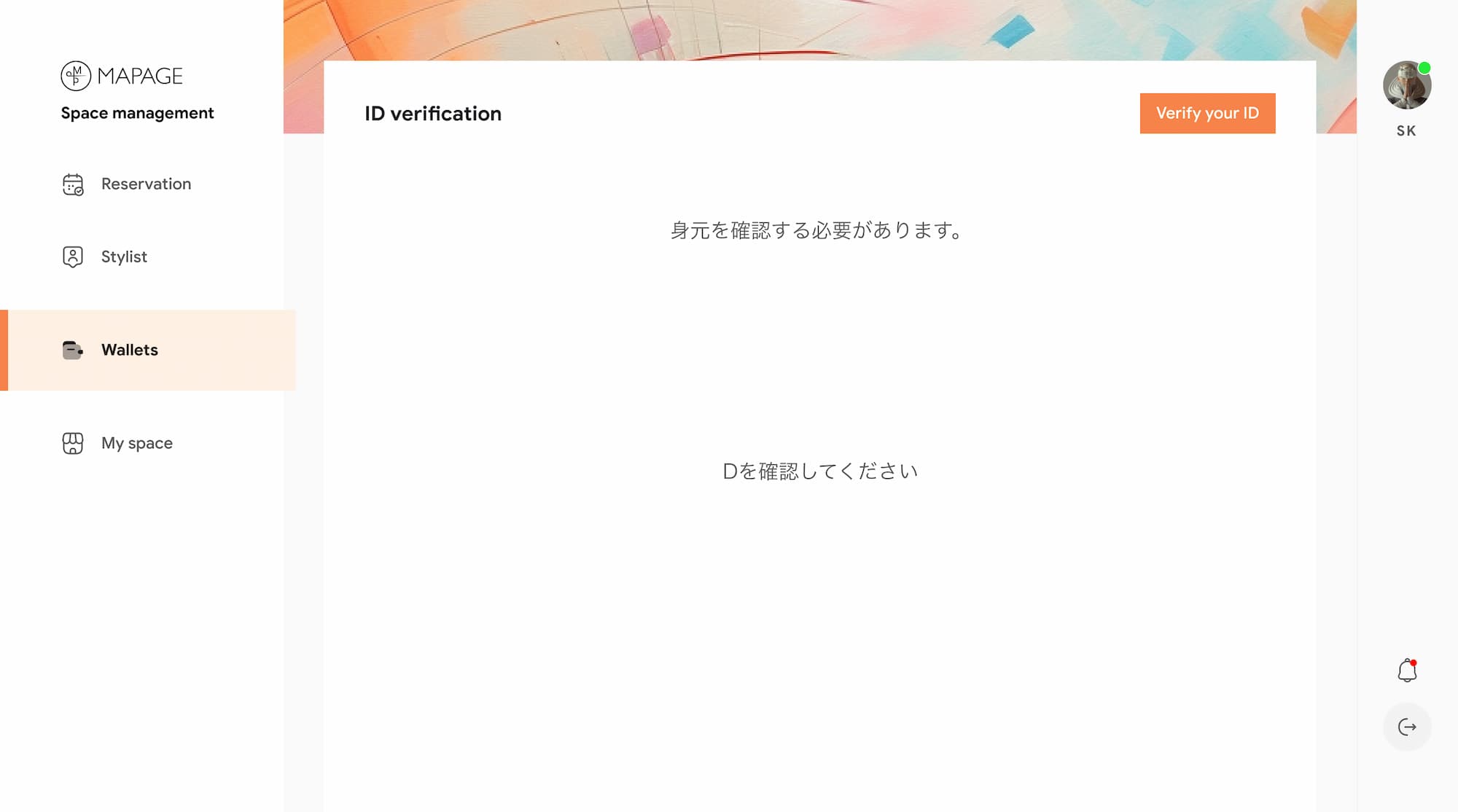
Blank Screen
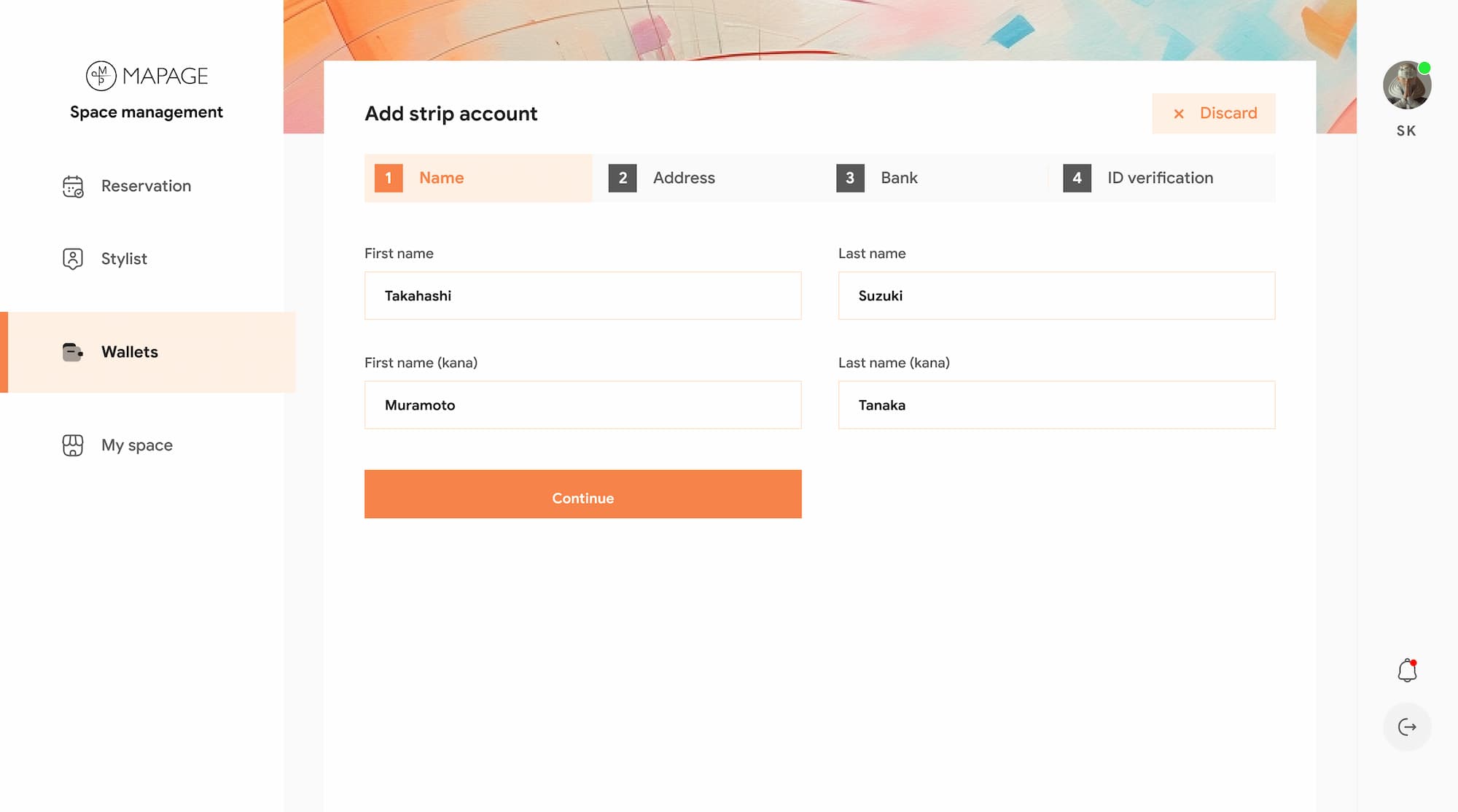
First Step
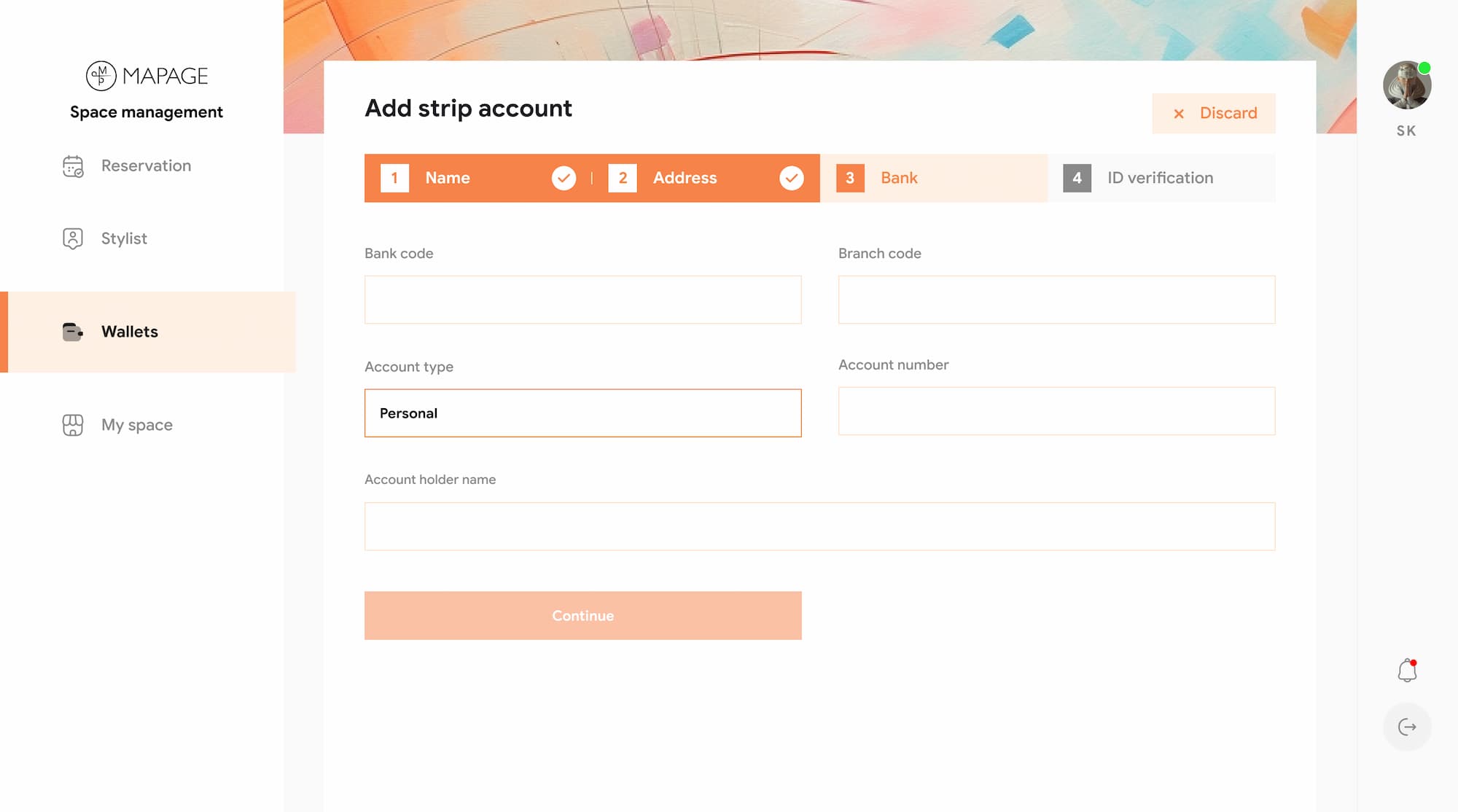
Bank Details
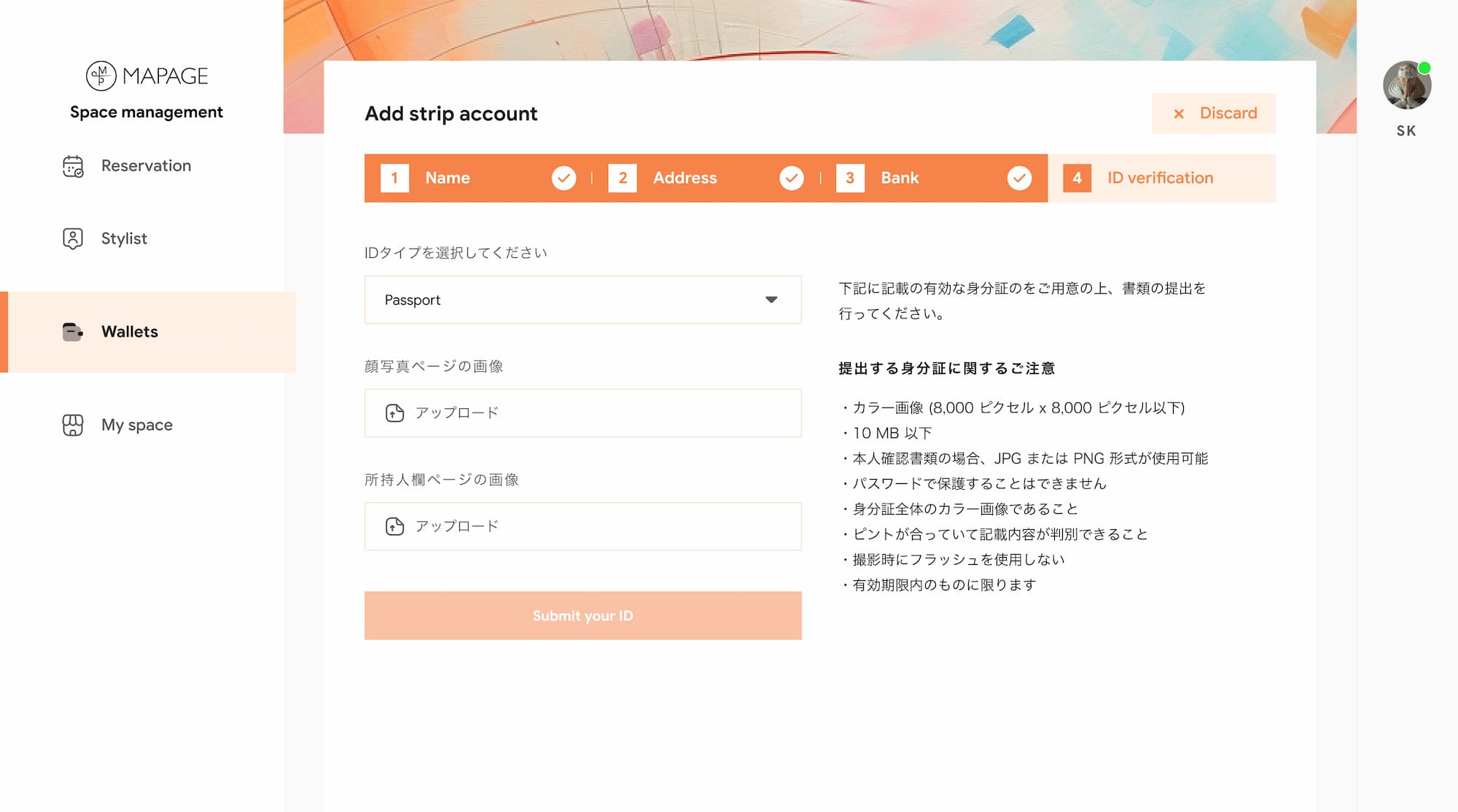
ID Verification

The Mapage web platform launched and became the operational backbone for 100+ salons across Japan, giving owners a single place to manage what used to live across spreadsheets, chat apps, and mental overhead.
But the number that matters more isn't the salons. It's the Saturday afternoon a salon owner didn't have to spend manually calculating who gets paid what.
The hardest design problems on this project weren't the complex screens. The availability setup, the four-step verification, the staff listing those had clear requirements and a logical path forward.
The hard part was the order of things. What does the owner see first? What should they not have to think about yet? When does the Publish button appear? These sequencing decisions shaped the entire experience, and none of them showed up in a brief.
Working from pre-existing Japanese research also taught me something I hadn't fully appreciated before deeply understanding findings you didn't collect yourself requires a different kind of rigor. You can't fill gaps with assumptions when the market isn't yours to assume about.
The biggest lesson: complexity doesn't need to feel complex. It just needs to be absorbed by the architecture before it reaches the user.