Field Servicely Redesign: Elevating User Experience for Sustainable Growth

Field Servicely Redesign: Elevating User Experience for Sustainable Growth

What is FieldServicely?

What is FieldServicely?

What is FieldServicely?

FieldServicely is an enterprise-grade SaaS platform designed to simplify Field Service Management.

It empowers organizations to seamlessly manage and track field jobs, technicians, and contractors in real-time.

FieldServicely is an enterprise-grade SaaS platform designed to simplify Field Service Management.

It empowers organizations to seamlessly manage and track field jobs, technicians, and contractors in real-time.

FieldServicely is an enterprise-grade SaaS platform designed to simplify Field Service Management.

It empowers organizations to seamlessly manage and track field jobs, technicians, and contractors in real-time.

In this case study, I’ll walk through the end-to-end redesign of Field Servicely. I’ll share how I led the design strategy and partnered with cross-functional teams to transform a complex legacy system into a modern, intuitive experience that directly contributes to user retention and business scalability.

In this case study, I’ll walk through the end-to-end redesign of Field Servicely. I’ll share how I led the design strategy and partnered with cross-functional teams to transform a complex legacy system into a modern, intuitive experience that directly contributes to user retention and business scalability.

In this case study, I’ll walk through the end-to-end redesign of Field Servicely. I’ll share how I led the design strategy and partnered with cross-functional teams to transform a complex legacy system into a modern, intuitive experience that directly contributes to user retention and business scalability.

Challenges

Challenges

FieldServicely’s legacy interface was struggling to keep pace with a rapidly evolving market. With a cluttered hierarchy and outdated visual language, the platform felt heavy compared to more modern competitors.

FieldServicely’s legacy interface was struggling to keep pace with a rapidly evolving market. With a cluttered hierarchy and outdated visual language, the platform felt heavy compared to more modern competitors.

Redesign Goals:

Elevate the Brand: Overhaul the visual identity to create an elegant, high-end SaaS aesthetic that competes with industry leaders.

Optimize Hierarchy: Restructure complex data views to reduce cognitive load, making it easier for users to manage technicians and jobs.

Drive Retention & Growth: By improving usability and "joy of use," we aimed to turn the product into a competitive advantage that attracts new enterprise clients.

Elevate the Brand: Overhaul the visual identity to create an elegant, high-end SaaS aesthetic that competes with industry leaders.

Optimize Hierarchy: Restructure complex data views to reduce cognitive load, making it easier for users to manage technicians and jobs.

Drive Retention & Growth: By improving usability and "joy of use," we aimed to turn the product into a competitive advantage that attracts new enterprise clients.

The Result: The redesign has already shifted industry perception, moving FieldServicely from an "outdated tool" to a recognized top-tier competitor.

The Result:

The redesign has already shifted industry perception, moving FieldServicely from an "outdated tool" to a recognized top-tier competitor.

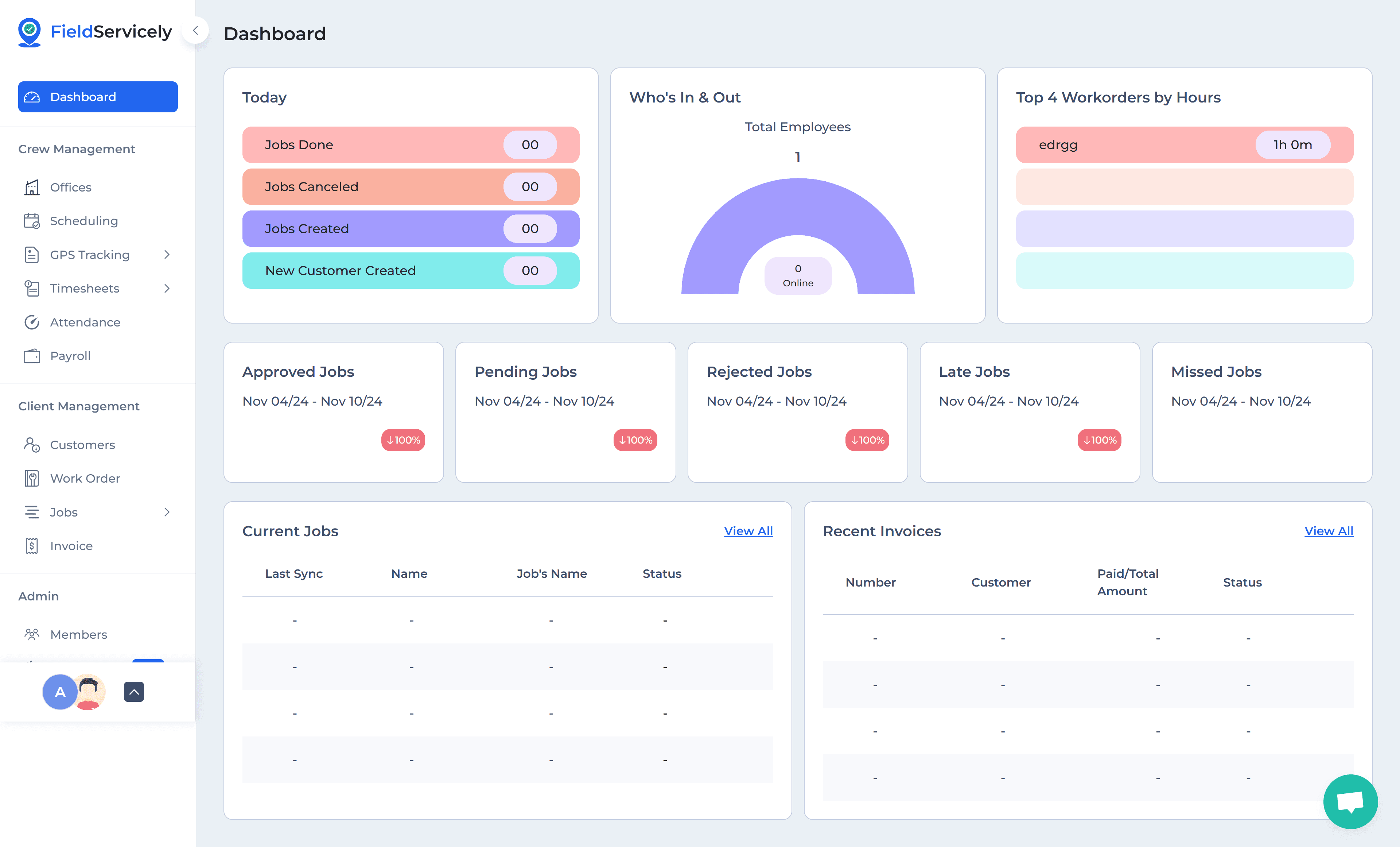
Before

Before

After

After

My Role : Lead Product Designer (Solo)

I owned the end-to-end evolution of FieldServicely, transforming a fragmented interface into a cohesive, scalable ecosystem. My focus was balancing complex business logic with a high-trust user experience.

I owned the end-to-end evolution of FieldServicely, transforming a fragmented interface into a cohesive, scalable ecosystem. My focus was balancing complex business logic with a high-trust user experience.

End-to-End Ownership: Managed the full design process. From initial discovery and low-fidelity logic mapping to the delivery of a high-fidelity, developer-ready design system for the entire web application.

Strategic Research: Synthesized cross-functional data into core User Personas to anchor the product roadmap, ensuring global design decisions were driven by validated user needs and business KPIs.

System Thinking: Re-architected the platform’s Information Architecture (IA) and navigation logic to support deep integrations and complex data flows while maintaining a simple, intuitive user experience.

Cross-Functional Partnership: Acted as the primary bridge between stakeholders and engineering, facilitating alignment through interactive prototypes and clear communication of the "why" behind the design strategy.

End-to-End Ownership: Managed the full design process. From initial discovery and low-fidelity logic mapping to the delivery of a high-fidelity, developer-ready design system for the entire web application.

Strategic Research: Synthesized cross-functional data into core User Personas to anchor the product roadmap, ensuring global design decisions were driven by validated user needs and business KPIs.

System Thinking: Re-architected the platform’s Information Architecture (IA) and navigation logic to support deep integrations and complex data flows while maintaining a simple, intuitive user experience.

Cross-Functional Partnership: Acted as the primary bridge between stakeholders and engineering, facilitating alignment through interactive prototypes and clear communication of the "why" behind the design strategy.

Design process

Design process

While working within a fast-paced MVP timeline, I ensured that I touched every stage of the NNG Design Thinking process. While I couldn't perform a "textbook" cycle due to limited resources, I strategically adapted the framework to maintain a high UX standard while meeting our launch goals.

While working within a fast-paced MVP timeline, I ensured that I touched every stage of the NNG Design Thinking process. While I couldn't perform a "textbook" cycle due to limited resources, I strategically adapted the framework to maintain a high UX standard while meeting our launch goals.

Research & Discovery

Research & Discovery

Uncovering Insights through Cross-Functional Collaboration

Uncovering Insights through Cross-Functional Collaboration

In a fast-paced environment where traditional contextual inquiry wasn't feasible, I leaned into cross-functional collaboration to gather deep insights. By triangulating data from different departments, I built a comprehensive understanding of the user and the market in a fraction of the time.

In a fast-paced environment where traditional contextual inquiry wasn't feasible, I leaned into cross-functional collaboration to gather deep insights. By triangulating data from different departments, I built a comprehensive understanding of the user and the market in a fraction of the time.

Key Research Activities:

Competitive Benchmarking: Partnered with Marketing team to audit industry leaders like Jobber, Connecteam, ActiveTrack and ServiceTitan. This helped us identify the "Gold Standard" features and visual aesthetics required to position FieldServicely as a top-tier competitor.

The Sales Lens: Held knowledge-sharing sessions with the Sales team to pinpoint why potential clients were hesitant to sign up. I identified that "UI trust" was a major factor—if the tool looked old, users assumed the technology was old.

Engineering Sync-ups: Collaborated with the Dev team from day one. By understanding our technical architecture early, I ensured that every design decision was high-impact but technically feasible for an MVP launch.

Competitive Benchmarking: Partnered with Marketing team to audit industry leaders like Jobber, Connecteam, ActiveTrack and ServiceTitan. This helped us identify the "Gold Standard" features and visual aesthetics required to position FieldServicely as a top-tier competitor.

The Sales Lens: Held knowledge-sharing sessions with the Sales team to pinpoint why potential clients were hesitant to sign up. I identified that "UI trust" was a major factor—if the tool looked old, users assumed the technology was old.

Engineering Sync-ups: Collaborated with the Dev team from day one. By understanding our technical architecture early, I ensured that every design decision was high-impact but technically feasible for an MVP launch.

Some to common problems I’ve discovered

Some to common problems I’ve discovered

Sales: The UI looks outdated, making it hard to sell against modern competitors.

Marketing: The complex layout makes the product look harder to use than it actually is.

Support: Users are constantly asking where to find feature because the hierarchy is confusing.

Sales: The UI looks outdated, making it hard to sell against modern competitors.

Marketing: The complex layout makes the product look harder to use than it actually is.

Support: Users are constantly asking where to find feature because the hierarchy is confusing.

Ideation

Ideation

Simplifying Complexity through Information Architecture & User Flow

With research insights in hand, I moved into structuring the experience. As the solo designer, my goal was to transform complex data requirements, like technician schedules, real-time tracking, and job invoicing, route optimization and so on into a seamless, logical flow that felt intuitive for organization owners and dispatchers.

With research insights in hand, I moved into structuring the experience. As the solo designer, my goal was to transform complex data requirements, like technician schedules, real-time tracking, and job invoicing, route optimization and so on into a seamless, logical flow that felt intuitive for organization owners and dispatchers.

Strategic Execution:

Redefining the Information Architecture: I audited the existing menu and page structures to eliminate "dead ends." My focus was on creating a persistent navigation system that allows users to switch between high-level reporting and granular job details in two clicks or less.

User Flow Optimization: I mapped out the most critical "Action Paths" (e.g., Creating a new job → Assigning a technician → Tracking status). I identified where users were previously getting lost and restructured these paths to reduce clicks and cognitive load.

Data Density vs. Clarity: In Field Service Management, data is king. I worked on balancing "Data Density" (showing enough info to be useful) with "Visual Clarity" (ensuring the UI doesn't feel overwhelming).

Redefining the Information Architecture: I audited the existing menu and page structures to eliminate "dead ends." My focus was on creating a persistent navigation system that allows users to switch between high-level reporting and granular job details in two clicks or less.

User Flow Optimization: I mapped out the most critical "Action Paths" (e.g., Creating a new job → Assigning a technician → Tracking status). I identified where users were previously getting lost and restructured these paths to reduce clicks and cognitive load.

Data Density vs. Clarity: In Field Service Management, data is king. I worked on balancing "Data Density" (showing enough info to be useful) with "Visual Clarity" (ensuring the UI doesn't feel overwhelming).

Wireframing & Rapid Iteration

Once the IA and user flows were finalized, I moved into low-fidelity wireframing. This stage was about exploration, testing multiple layout solutions to see how they handled real-world data density without the distraction of high-fidelity styling.

Once the IA and user flows were finalized, I moved into low-fidelity wireframing. This stage was about exploration, testing multiple layout solutions to see how they handled real-world data density without the distraction of high-fidelity styling.

Why I Prioritized Low-Fidelity:

Collaborative Exploration: I created several conceptual wireframes to explore different ways of displaying complex data, such as job queues and technician status. Presenting these in open review sessions allowed the team to weigh in on the logic before we committed to the look.

Early-Stage Validation: By iterating in low-fi, we identified usability hurdles, like "cluttered" dashboard widgets, early in the cycle. This saved significant development time by ensuring we only moved to high-fidelity once the core UX logic was solid.

Building Stakeholder Consensus: I used these wireframes to facilitate iterative discussions with the Product Owner and Lead Developer. If a solution didn't feel right or wasn't technically feasible, I went back to the drawing board immediately, ensuring we were all aligned on the final direction.

Collaborative Exploration: I created several conceptual wireframes to explore different ways of displaying complex data, such as job queues and technician status. Presenting these in open review sessions allowed the team to weigh in on the logic before we committed to the look.

Early-Stage Validation: By iterating in low-fi, we identified usability hurdles, like "cluttered" dashboard widgets, early in the cycle. This saved significant development time by ensuring we only moved to high-fidelity once the core UX logic was solid.

Building Stakeholder Consensus: I used these wireframes to facilitate iterative discussions with the Product Owner and Lead Developer. If a solution didn't feel right or wasn't technically feasible, I went back to the drawing board immediately, ensuring we were all aligned on the final direction.

I've used AI tools to create initial wireframes. They helped me iterate and evaluate ideas quickly in the early stages.

I've used AI tools to create initial wireframes. They helped me iterate and evaluate ideas quickly in the early stages.

Visual Design & High-Fidelity UI

Visual Design & High-Fidelity UI

Creating a System for Scale and Trust

Creating a System for Scale and Trust

This phase was about more than just a "visual refresh." I aimed to create a professional, high-trust visual language that felt like a tool for the modern era. By grounding every decision in UX Laws and building a Scalable Component Library, I ensured the redesign was as mathematically sound as it was beautiful.

This phase was about more than just a "visual refresh." I aimed to create a professional, high-trust visual language that felt like a tool for the modern era. By grounding every decision in UX Laws and building a Scalable Component Library, I ensured the redesign was as mathematically sound as it was beautiful.

Grounded in UX Science

To reduce cognitive friction and maximize user speed, I applied core psychological principles across the platform, some to them in below:

To reduce cognitive friction and maximize user speed, I applied core psychological principles across the platform, some to them in below:

Cognitive Load & Hick’s Law: I simplified the complex scheduling workflows, reducing "decision paralysis" by chunking large amounts of data into digestible steps.

Miller’s Law & Proximity: I organized the dashboard into related "information clusters," ensuring users could process technician statuses and job details in under 5 seconds.

Fitts’s Law: Primary actions (like "Create Job") were strategically sized and placed to minimize the effort required for high-frequency interactions.

Cognitive Load & Hick’s Law: I simplified the complex scheduling workflows, reducing "decision paralysis" by chunking large amounts of data into digestible steps.

Miller’s Law & Proximity: I organized the dashboard into related "information clusters," ensuring users could process technician statuses and job details in under 5 seconds.

Fitts’s Law: Primary actions (like "Create Job") were strategically sized and placed to minimize the effort required for high-frequency interactions.

Precision & Technical Execution

To achieve a "world-class" aesthetic that could compete with industry giants, I followed a strict UI framework:

To achieve a "world-class" aesthetic that could compete with industry giants, I followed a strict UI framework:

8pt Grid System: I implemented a rigorous 8pt spatial system to ensure pixel-perfect alignment and a consistent visual rhythm that developers could easily replicate.

Visual Hierarchy & Clarity: By utilizing a calculated typographic scale and high-contrast color theory, I directed the user's focus toward critical "at-a-glance" metrics while keeping secondary data subtle.

The Component Library: I built a dedicated library of reusable UI atoms (buttons, badges, inputs) and molecules (data tables, cards). This "Single Source of Truth" ensured the design was not just a one-off, but a scalable system ready for future growth.

8pt Grid System: I implemented a rigorous 8pt spatial system to ensure pixel-perfect alignment and a consistent visual rhythm that developers could easily replicate.

Visual Hierarchy & Clarity: By utilizing a calculated typographic scale and high-contrast color theory, I directed the user's focus toward critical "at-a-glance" metrics while keeping secondary data subtle.

The Component Library: I built a dedicated library of reusable UI atoms (buttons, badges, inputs) and molecules (data tables, cards). This "Single Source of Truth" ensured the design was not just a one-off, but a scalable system ready for future growth.

UI DESIGN

Schedule Page

My goal was to transform the scheduling "nerve center" into a low-friction experience. By applying visual hierarchy and information clustering, I reorganized related data points to ensure the interface requires significantly less cognitive effort to navigate.

My goal was to transform the scheduling "nerve center" into a low-friction experience. By applying visual hierarchy and information clustering, I reorganized related data points to ensure the interface requires significantly less cognitive effort to navigate.

Key Enhancements:

Information Clustering: Grouped related scheduling data to reduce eye-scanning time and improve data relationships.

Meaningful Color Logic: Implemented a purposeful color palette to provide instant visual cues for job statuses and technician availability.

Multi-Dimensional Views: Designed consistent, intuitive tabs for Daily, Weekly, Monthly, and Map views, allowing users to switch contexts without losing focus.

Visual Clarity: Balanced high data density with clean spacing to ensure the UI remains professional and easy to parse under pressure.

Key Enhancements:

Information Clustering: Grouped related scheduling data to reduce eye-scanning time and improve data relationships.

Meaningful Color Logic: Implemented a purposeful color palette to provide instant visual cues for job statuses and technician availability.

Multi-Dimensional Views: Designed consistent, intuitive tabs for Daily, Weekly, Monthly, and Map views, allowing users to switch contexts without losing focus.

Visual Clarity: Balanced high data density with clean spacing to ensure the UI remains professional and easy to parse under pressure.

Route Optimization

This feature empowers managers to eliminate guesswork and maximize field productivity. By integrating advanced routing logic, we’ve designed a tool that allows for precise control over technician travel, directly impacting the business's bottom line.

This feature empowers managers to eliminate guesswork and maximize field productivity. By integrating advanced routing logic, we’ve designed a tool that allows for precise control over technician travel, directly impacting the business's bottom line.

Customizable Strategies: Managers can optimize routes based on specific business goals: Shortest (distance), Fastest (time), or Balanced (workload distribution).

Precision Control: Built-in functionality to define custom Start and End locations for every employee, ensuring a personalized and realistic daily plan.

Detailed Itineraries: Beyond just a line on a map, I provided a granular view of the route plan, giving managers full transparency into every stop and turn.

Customizable Strategies: Managers can optimize routes based on specific business goals: Shortest (distance), Fastest (time), or Balanced (workload distribution).

Precision Control: Built-in functionality to define custom Start and End locations for every employee, ensuring a personalized and realistic daily plan.

Detailed Itineraries: Beyond just a line on a map, I provided a granular view of the route plan, giving managers full transparency into every stop and turn.

Impact: This feature transforms a complex logistics challenge into a streamlined, automated process. By removing the need for manual calculations, we are helping managers significantly reduce planning time and eliminate human error in fleet coordination.

Impact: This feature transforms a complex logistics challenge into a streamlined, automated process. By removing the need for manual calculations, we are helping managers significantly reduce planning time and eliminate human error in fleet coordination.

Job Creation Flow

The redesigned job creation flow empowers managers to transition from intent to action without friction. By streamlining the input process, I simplified the path to create, assign, and manage jobs in a single, unified experience.

The redesigned job creation flow empowers managers to transition from intent to action without friction. By streamlining the input process, I simplified the path to create, assign, and manage jobs in a single, unified experience.

Process Improvements:

Task-Based Efficiency: Reduced the complexity of the "New Job" process, allowing managers to input data, select a technician, and dispatch orders seamlessly.

Smart Assignment: Integrated availability and location data directly into the flow, ensuring that assigning the right technician is an intuitive part of the creation process.

Logical Progress: Organized the form into clear, logical sections to prevent information overload and ensure no critical job details are missed.

Task-Based Efficiency: Reduced the complexity of the "New Job" process, allowing managers to input data, select a technician, and dispatch orders seamlessly.

Smart Assignment: Integrated availability and location data directly into the flow, ensuring that assigning the right technician is an intuitive part of the creation process.

Logical Progress: Organized the form into clear, logical sections to prevent information overload and ensure no critical job details are missed.

Impact: This optimization eliminates workflow bottlenecks, allowing managers to handle high job volumes with speed and accuracy.

Impact: This optimization eliminates workflow bottlenecks, allowing managers to handle high job volumes with speed and accuracy.

Validation through Guerrilla Testing

Validation through Guerrilla Testing

When the launch window didn't allow for a full-scale external study, I pivoted to Internal Proxy Testing. To ensure unbiased results, I recruited colleagues from non-technical departments who had no prior involvement with the project.

When the launch window didn't allow for a full-scale external study, I pivoted to Internal Proxy Testing. To ensure unbiased results, I recruited colleagues from non-technical departments who had no prior involvement with the project.

The Testing Goal: My goal was to observe how "fresh eyes" navigated the new environment. I specifically looked for friction points in the Dashboard navigation and the data visualization cards to ensure the design was as intuitive as I intended.

The Testing Goal: My goal was to observe how "fresh eyes" navigated the new environment. I specifically looked for friction points in the Dashboard navigation and the data visualization cards to ensure the design was as intuitive as I intended.

Key Insights:

Task Performance: Observed if participants could create a new job and optimize a route without any verbal guidance.

Clarity Check: Validated whether the "Information Clusters" on the Schedule page were immediately understood by those unfamiliar with field service terminology.

Rapid Iteration: This feedback loop allowed me to make final adjustments to button labels and icon choices before the official handoff, ensuring the product was "field-ready."

Task Performance: Observed if participants could create a new job and optimize a route without any verbal guidance.

Clarity Check: Validated whether the "Information Clusters" on the Schedule page were immediately understood by those unfamiliar with field service terminology.

Rapid Iteration: This feedback loop allowed me to make final adjustments to button labels and icon choices before the official handoff, ensuring the product was "field-ready."

Whenever testing revealed a moment of hesitation or a usability hurdle, I immediately stepped back to the drawing board. I viewed every point of friction as an opportunity to refine the logic rather than a setback. This led to a series of back-and-forth iterations, where I rigorously tweaked layouts and simplified interactions until the flow felt truly intuitive and met my standard for a seamless user experience.

Whenever testing revealed a moment of hesitation or a usability hurdle, I immediately stepped back to the drawing board. I viewed every point of friction as an opportunity to refine the logic rather than a setback. This led to a series of back-and-forth iterations, where I rigorously tweaked layouts and simplified interactions until the flow felt truly intuitive and met my standard for a seamless user experience.

Implementation & Developer Handoff

Implementation & Developer Handoff

Ensuring Vision Becomes Reality

Design doesn't end at the export button. To ensure FieldServicely maintained its technical and visual integrity, I remained fully embedded with the engineering team throughout the implementation phase.

Design doesn't end at the export button. To ensure FieldServicely maintained its technical and visual integrity, I remained fully embedded with the engineering team throughout the implementation phase.

Supporting the Build:

Continuous Collaboration: I maintained an open feedback loop, holding regular "back-and-forth" sessions to resolve edge cases and technical hurdles in real-time.

Design QA (Quality Assurance): I conducted meticulous reviews of staging builds to ensure that the 8pt spacing, typography, and interactions remained "butter smooth" and consistent with the design system.

Pragmatic Problem Solving: When technical limitations arose, I didn't compromise the UX. Instead, I worked with developers to find creative workarounds that preserved the user experience while respecting the launch timeline.

Continuous Collaboration: I maintained an open feedback loop, holding regular "back-and-forth" sessions to resolve edge cases and technical hurdles in real-time.

Design QA (Quality Assurance): I conducted meticulous reviews of staging builds to ensure that the 8pt spacing, typography, and interactions remained "butter smooth" and consistent with the design system.

Pragmatic Problem Solving: When technical limitations arose, I didn't compromise the UX. Instead, I worked with developers to find creative workarounds that preserved the user experience while respecting the launch timeline.

Outcomes: By staying involved, I closed the gap between the Figma prototypes and the final code, ensuring a polished, high-performance product at launch.

Outcomes: By staying involved, I closed the gap between the Figma prototypes and the final code, ensuring a polished, high-performance product at launch.

Results & Key Takeaways

Results & Key Takeaways

The Impact of Purposeful Design

The redesign of FieldServicely successfully transitioned the platform from a complex internal tool to a scalable, user-centric product. By grounding every decision in UX logic, the final result wasn't just a visual upgrade, it was a strategic business asset.

The redesign of FieldServicely successfully transitioned the platform from a complex internal tool to a scalable, user-centric product. By grounding every decision in UX logic, the final result wasn't just a visual upgrade, it was a strategic business asset.

The Outcomes:

Operational Efficiency: The simplified Job Creation and Route Optimization flows significantly reduced the time managers spent on manual coordination.

User Confidence: Internal testing showed a marked increase in "first-time accuracy," meaning users could navigate the dashboard with minimal training.

Scalability: The new Component Library provided a robust foundation, allowing the engineering team to build and ship future features 2x faster.

Operational Efficiency: The simplified Job Creation and Route Optimization flows significantly reduced the time managers spent on manual coordination.

User Confidence: Internal testing showed a marked increase in "first-time accuracy," meaning users could navigate the dashboard with minimal training.

Scalability: The new Component Library provided a robust foundation, allowing the engineering team to build and ship future features 2x faster.

Lessons Learned:

Systems Over Screens: I learned that building a design system early is not a luxury, it’s a necessity for maintaining consistency and speed in a high-growth environment.

The Power of "No": By applying Hick’s Law, I realized that sometimes the best UX decision is removing a feature or an input field to keep the user focused on the primary goal.

Collaboration is Key: Being embedded with the developers taught me to design with technical constraints in mind, resulting in a more pragmatic and implementable final product.

Systems Over Screens: I learned that building a design system early is not a luxury, it’s a necessity for maintaining consistency and speed in a high-growth environment.

The Power of "No": By applying Hick’s Law, I realized that sometimes the best UX decision is removing a feature or an input field to keep the user focused on the primary goal.

Collaboration is Key: Being embedded with the developers taught me to design with technical constraints in mind, resulting in a more pragmatic and implementable final product.

Thanks for your time

Thanks for your time

See More Case Studies

Apploye WebApp Feature Design

Feature Design

SaaS

Report

UX Process

FieldServicely Webapp Redesign

Redesign

SaaS

Stunning Look

UX Process

e.rakib@gmail.com

e.rakib@gmail.com

e.rakib@gmail.com

e.rakib@gmail.com

Thanks for your time

Thanks for your time

Thanks for your time

See More Case Studies

Apploye WebApp Feature Design

Feature Design

SaaS

Report

UX Process

FieldServicely Webapp Redesign

Redesign

SaaS

Stunning Look

UX Process

See More Case Studies

Apploye WebApp Feature Design

Feature Design

SaaS

Report

UX Process

FieldServicely Webapp Redesign

Redesign

SaaS

Stunning Look

UX Process