Apploye Webapp: Designing for Stealth Productivity & Smarter Insights
What is Apploye?
What is Apploye?
Apploye is an employee productivity monitoring SaaS platform that helps organizations worldwide track and optimize their workforce performance.
Site URL
apploye.com
In this case study, I’ll walk through my feature design process at Apploye and share how I partnered with cross-functional teams to achieve our product goals.


Feature Name
Feature Name
Stealth mode and Apps productivity monitoring
Stealth mode
Stealth Mode allows organization owners to discreetly monitor working hours without disrupting the employee’s workflow. By running silently in the background, it ensures comprehensive activity tracking while maintaining a distraction-free environment for the team.
App & Productivity Labeling
This feature empowers company owners to define what "productivity" looks like for their specific business. By custom-labeling apps and URLs as Productive, Neutral, or Unproductive, managers get a clear, data-driven view of how time is being spent across the organization.
Why this feature?
The decision to develop these features was driven by a commitment to market alignment and user-led growth.
Solving User Pain Points: Existing clients specifically requested these features to help manage large-scale teams more effectively.
Competitive Parity: By analyzing industry leaders like Hubstaff and Insightful, we identified these features as essential for any enterprise-ready workforce platform.
Business Viability: To stay competitive and "business-ready," we needed to bridge this gap, ensuring Apploye remains a robust choice for companies looking for sophisticated, high-level productivity insights.
The decision to develop these features was driven by a commitment to market alignment and user-led growth.
Solving User Pain Points: Existing clients specifically requested these features to help manage large-scale teams more effectively.
Competitive Parity: By analyzing industry leaders like Hubstaff and Insightful, we identified these features as essential for any enterprise-ready workforce platform.
Business Viability: To stay competitive and "business-ready," we needed to bridge this gap, ensuring Apploye remains a robust choice for companies looking for sophisticated, high-level productivity insights.
The decision to develop these features was driven by a commitment to market alignment and user-led growth.
Solving User Pain Points: Existing clients specifically requested these features to help manage large-scale teams more effectively.
Competitive Parity: By analyzing industry leaders like Hubstaff and Insightful, we identified these features as essential for any enterprise-ready workforce platform.
Business Viability: To stay competitive and "business-ready," we needed to bridge this gap, ensuring Apploye remains a robust choice for companies looking for sophisticated, high-level productivity insights.
My Role : Lead Product Designer (Solo)
As the solo designer for this project, I owned the end-to-end evolution of Apploye’s core features. My goal was to move beyond simple interface refinement and instead build a cohesive, scalable experience that balances business objectives with user trust.
What I did
End-to-End Ownership: From initial competitor analysis and user flows to high-fidelity prototyping and developer handoff, I managed every stage of the design lifecycle.
Strategic Research: Conducted cross-team research to ensure our information architecture met the needs of both administrators and employees.
System Thinking: Developed a scalable design system from the ground up to ensure long-term consistency and speed up the development process.
Cross-Functional Partnership: Acted as the sole design voice in collaboration with product and engineering teams to ensure every feature was technically feasible and strategically aligned.
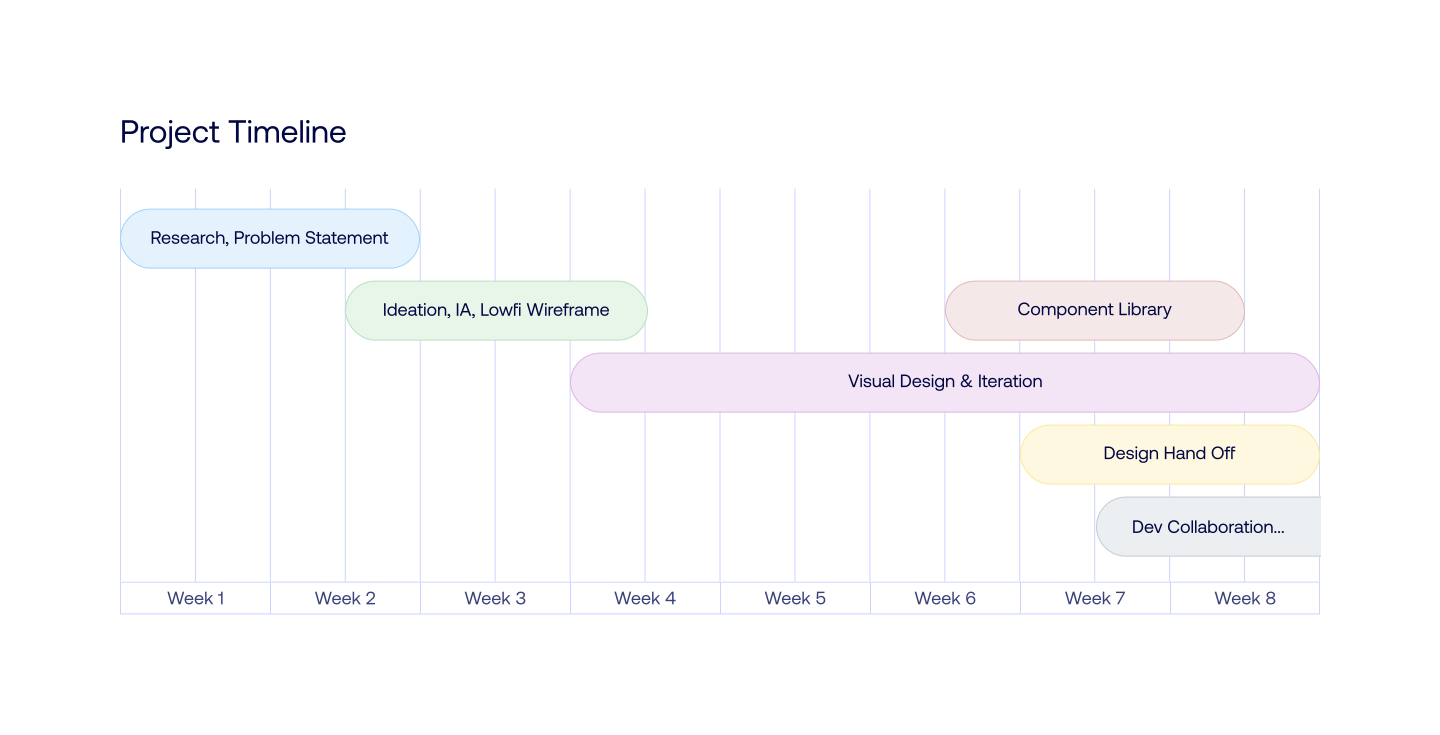
End-to-End Ownership: From initial competitor analysis and user flows to high-fidelity prototyping and developer handoff, I managed every stage of the design lifecycle.
Strategic Research: Conducted cross-team research to ensure our information architecture met the needs of both administrators and employees.
System Thinking: Developed a scalable design system from the ground up to ensure long-term consistency and speed up the development process.
Cross-Functional Partnership: Acted as the sole design voice in collaboration with product and engineering teams to ensure every feature was technically feasible and strategically aligned.
Design process
Design process
Design process
While working within a fast-paced MVP timeline, I ensured that I touched every stage of the design process. While I couldn't perform a textbook "Design Thinking" cycle due to limited resources, I strategically adapted the framework to maintain a high standard of user experience while meeting our launch goals.
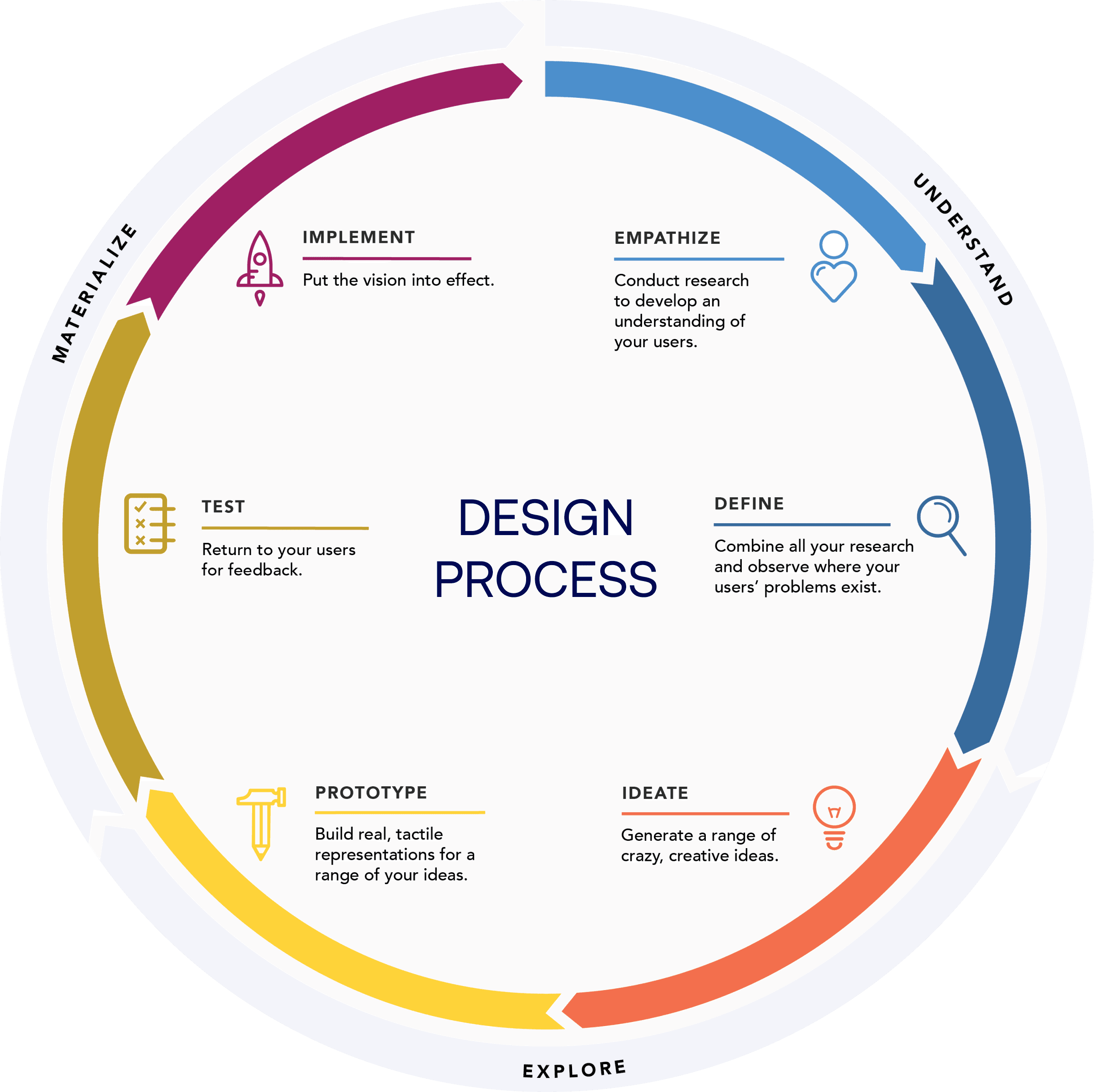


Research & Discovery
In a fast-paced environment where traditional contextual inquiry wasn't feasible, I leaned into cross-functional collaboration to gather deep insights. By triangulating data from different departments, I was able to build a comprehensive understanding of the user and the market in a fraction of the time.
Key Research Activities:

Competitor Analysis: Partnered with the Marketing team to audit industry leaders like Hubstaff and Insightful, identifying the "must-have" features required to stay competitive.
Sales Insights: Held knowledge-sharing sessions with the Sales team to identify the most common pain points and feature requests from current and prospective customers.
Technical Feasibility: Collaborated closely with the Engineering team from day one to understand technical constraints, ensuring my designs were ambitious yet buildable.
The Outcome: This collaborative approach allowed me to bypass traditional research hurdles and move directly into the design phase with a validated list of user needs and technical requirements.
Competitor Analysis: Partnered with the Marketing team to audit industry leaders like Hubstaff and Insightful, identifying the "must-have" features required to stay competitive.
Sales Insights: Held knowledge-sharing sessions with the Sales team to identify the most common pain points and feature requests from current and prospective customers.
Technical Feasibility: Collaborated closely with the Engineering team from day one to understand technical constraints, ensuring my designs were ambitious yet buildable.
The Outcome: This collaborative approach allowed me to bypass traditional research hurdles and move directly into the design phase with a validated list of user needs and technical requirements.


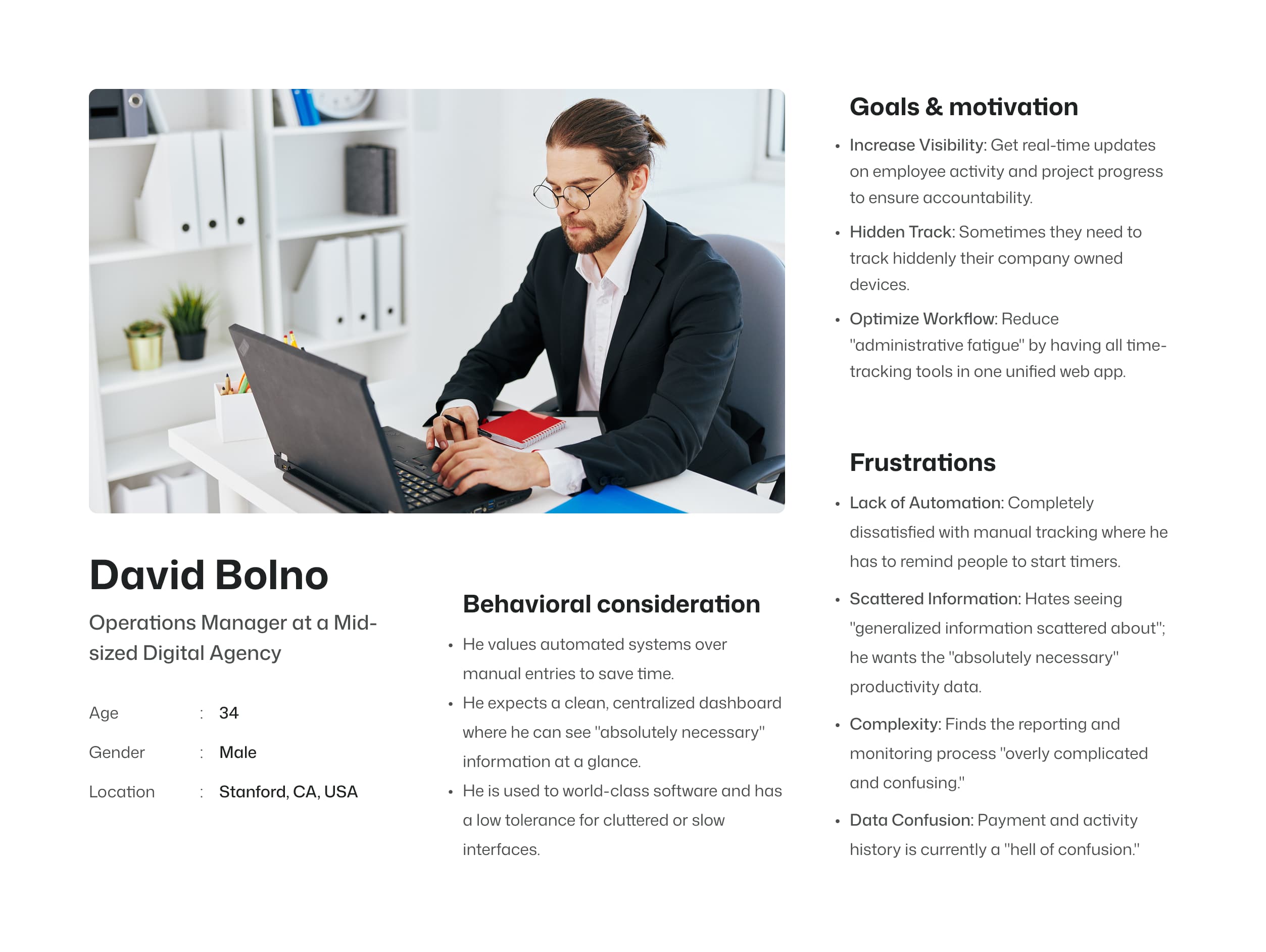
User Persona
I’ve synthesized cross-functional data into a core User Persona to anchor our product roadmap. This allows us to move away from assumptions and prioritize solutions based on validated user needs and pain points.


Ideation
Information Architecture & User Flow
With the research insights in hand, I moved into structuring the experience. As the solo designer, my goal was to transform complex data requirements into a seamless, logical flow that felt intuitive for organization owners.
Strategic Execution:
Defining the Foundation: I synthesized competitor data and business requirements to build a robust Information Architecture, ensuring a clear hierarchy that prioritizes the most critical data points.
User-Centric Mapping: I mapped out detailed User Flows from the administrator’s perspective, focusing on reducing friction and creating the most direct path to high-level productivity insights.
Stakeholder Validation: Since rapid delivery was a priority, I used stakeholder reviews as my primary validation tool. I presented multiple architectural approaches, using their feedback to refine the logic before moving into high-fidelity design.
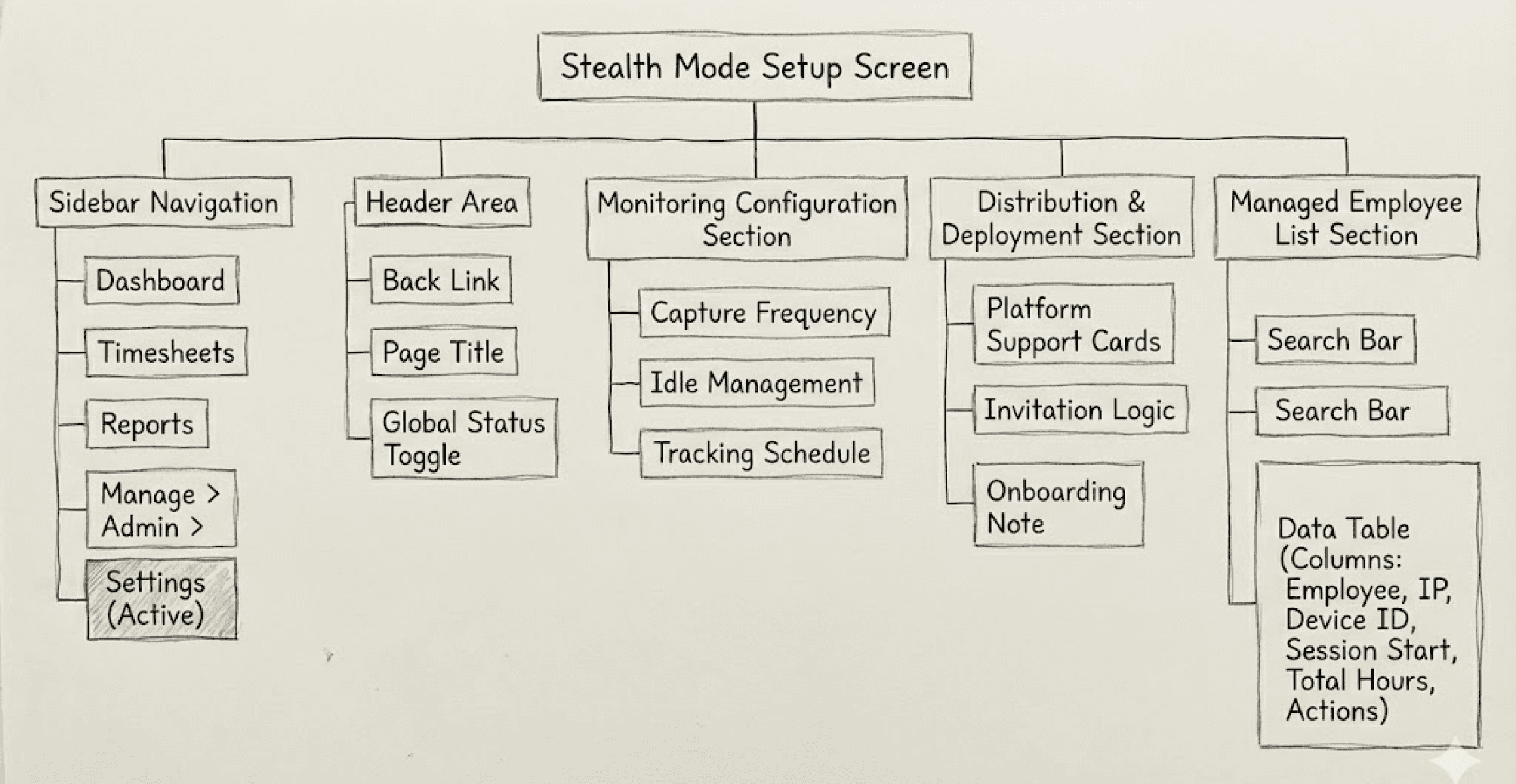
Defining the Foundation: I synthesized competitor data and business requirements to build a robust Information Architecture, ensuring a clear hierarchy that prioritizes the most critical data points.
User-Centric Mapping: I mapped out detailed User Flows from the administrator’s perspective, focusing on reducing friction and creating the most direct path to high-level productivity insights.
Stakeholder Validation: Since rapid delivery was a priority, I used stakeholder reviews as my primary validation tool. I presented multiple architectural approaches, using their feedback to refine the logic before moving into high-fidelity design.

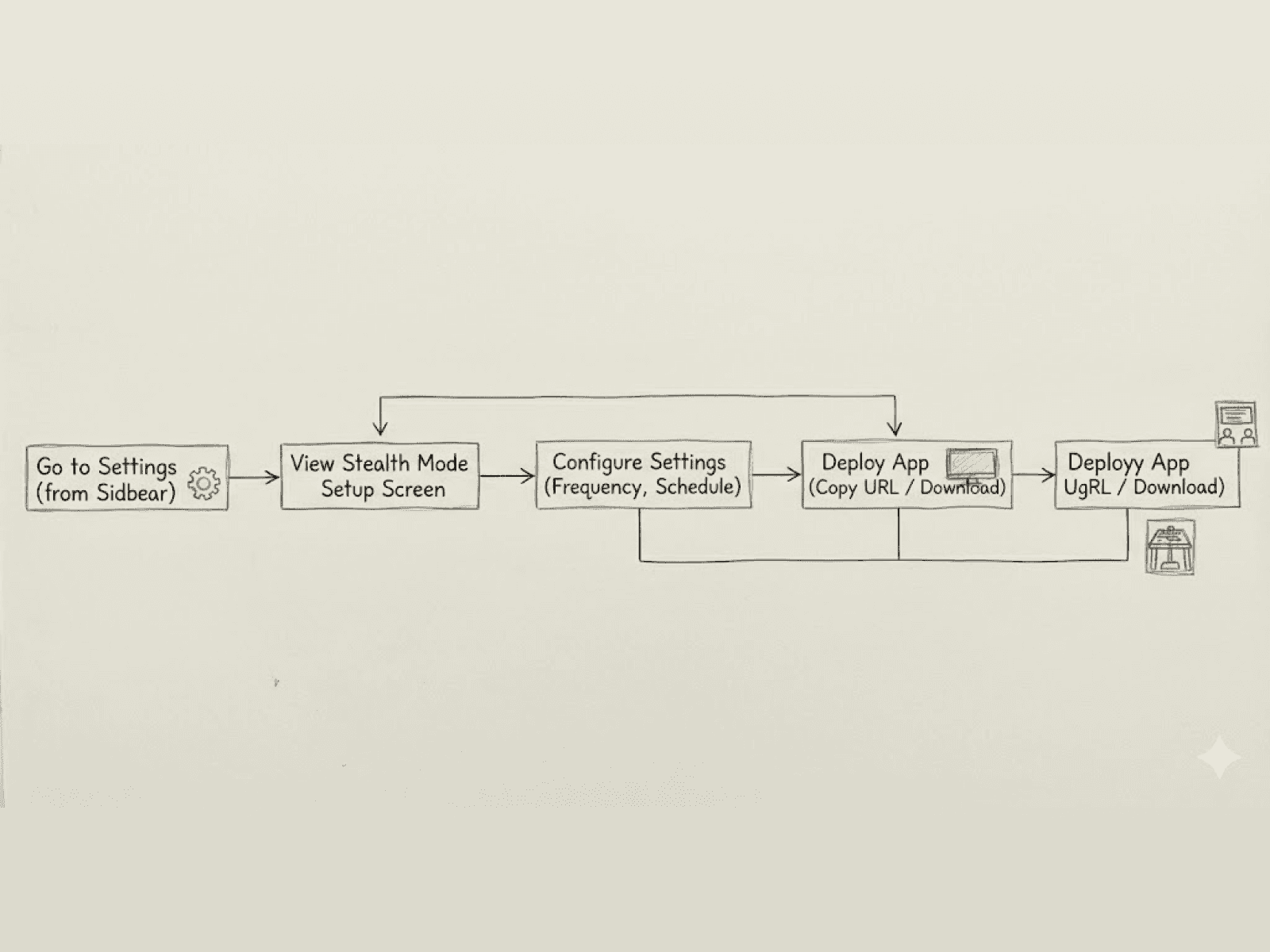


I've used AI tools to create initial IA and user flows. They helped me iterate and evaluate ideas quickly in the early stages.
Wireframing & Rapid Iteration
Once the IA and user flows were finalized, I moved into low-fidelity wireframing. This stage was about exploration and "failing fast" testing multiple layout solutions without the overhead of high-fidelity details.
The Power of Low-Fi:
Collaborative Exploration: I created several conceptual sketches to explore different ways of displaying complex data. These were presented to the team in open review sessions.
Early-Stage Validation: By iterating in low-fidelity, we were able to identify potential usability hurdles early. This saved significant development time by ensuring we only moved to high-fidelity once the core logic was solid.
Alignment through Dialogue: I facilitated iterative discussion sessions to ensure every stakeholder was aligned on the direction. I only moved forward once we had a consensus; if the solution didn't feel right, I went back to the drawing board.
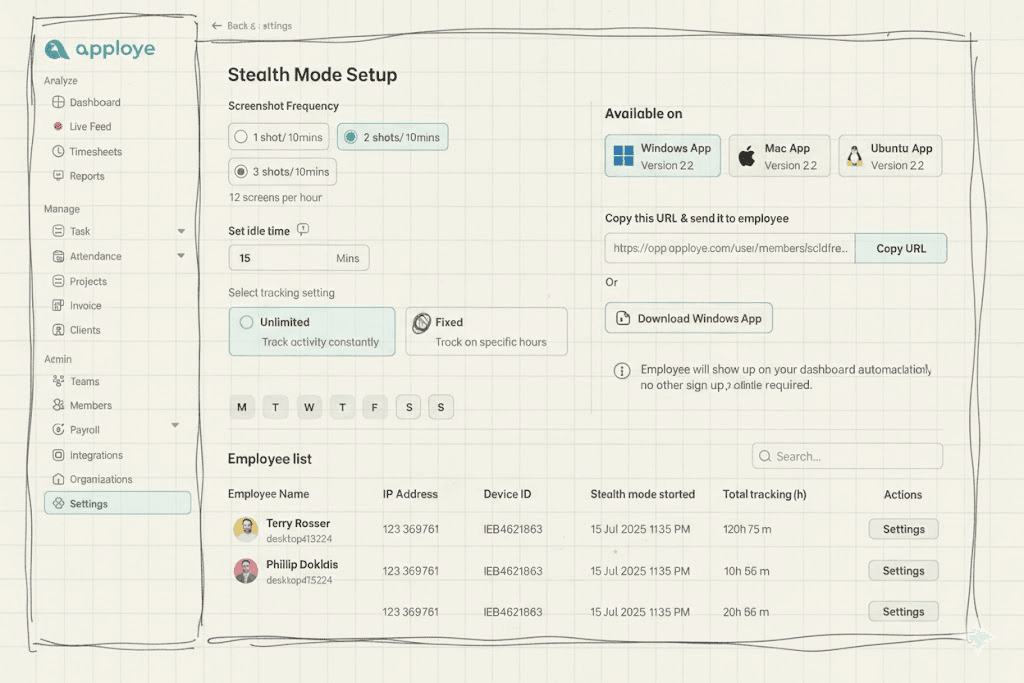
Collaborative Exploration: I created several conceptual sketches to explore different ways of displaying complex data. These were presented to the team in open review sessions.
Early-Stage Validation: By iterating in low-fidelity, we were able to identify potential usability hurdles early. This saved significant development time by ensuring we only moved to high-fidelity once the core logic was solid.
Alignment through Dialogue: I facilitated iterative discussion sessions to ensure every stakeholder was aligned on the direction. I only moved forward once we had a consensus; if the solution didn't feel right, I went back to the drawing board.

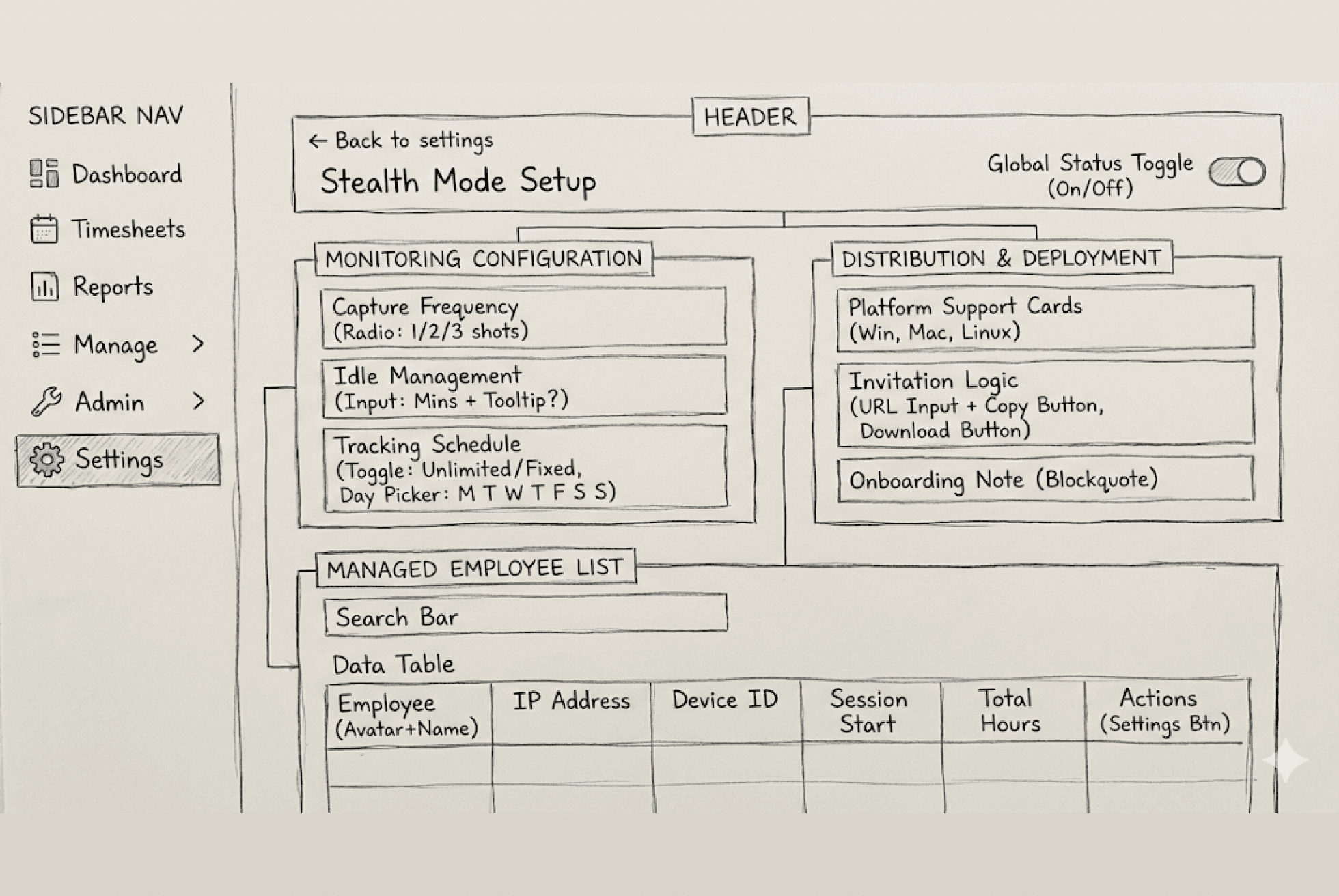


I've used AI tools to create initial wireframes. They helped me iterate and evaluate ideas quickly in the early stages.
Continuous Improvement: While this MVP meets our current goals, we’ve planned post-launch usability testing to identify optimization opportunities and evolve the feature set.
Visual Design & Design System
This phase was about more than just aesthetics; it was about creating a cohesive visual language that felt professional, reliable, and easy to navigate. By building a dedicated Component Library alongside my high-fidelity screens, I ensured that the design was not only beautiful but also scalable for future development.
Strategic Visual Execution:
Visual Identity: I applied a clean, modern UI to the wireframes, focusing on high-contrast typography and a purposeful color palette to make complex data tables and reports easy to scan.
Building the Component Library: To optimize the handoff, I built a centralized library of reusable Figma components, including buttons, input fields, and custom data-visualization modules.
Consistency & Efficiency: This "systems-first" approach allowed me to maintain 100% consistency across all screens and significantly reduced the engineering team's effort during the build phase.
Visual Identity: I applied a clean, modern UI to the wireframes, focusing on high-contrast typography and a purposeful color palette to make complex data tables and reports easy to scan.
Building the Component Library: To optimize the handoff, I built a centralized library of reusable Figma components, including buttons, input fields, and custom data-visualization modules.
Consistency & Efficiency: This "systems-first" approach allowed me to maintain 100% consistency across all screens and significantly reduced the engineering team's effort during the build phase.
Linking
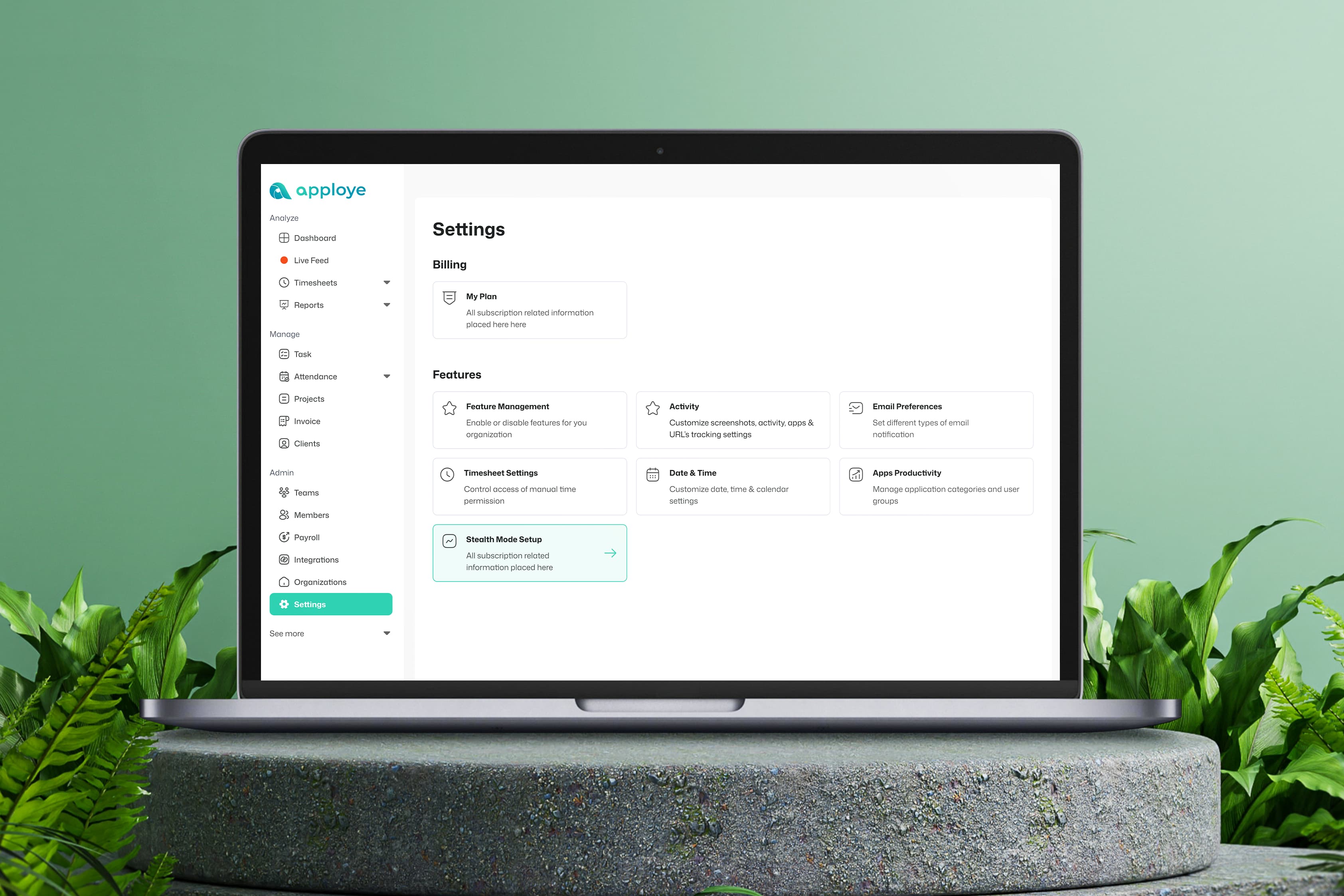
This is the settings page where all key configuration options live. Here, organization owners can access critical features like "Stealth Mode" and "Apps Productivity" settings. Clicking on either option takes them into the detailed configuration for that feature.


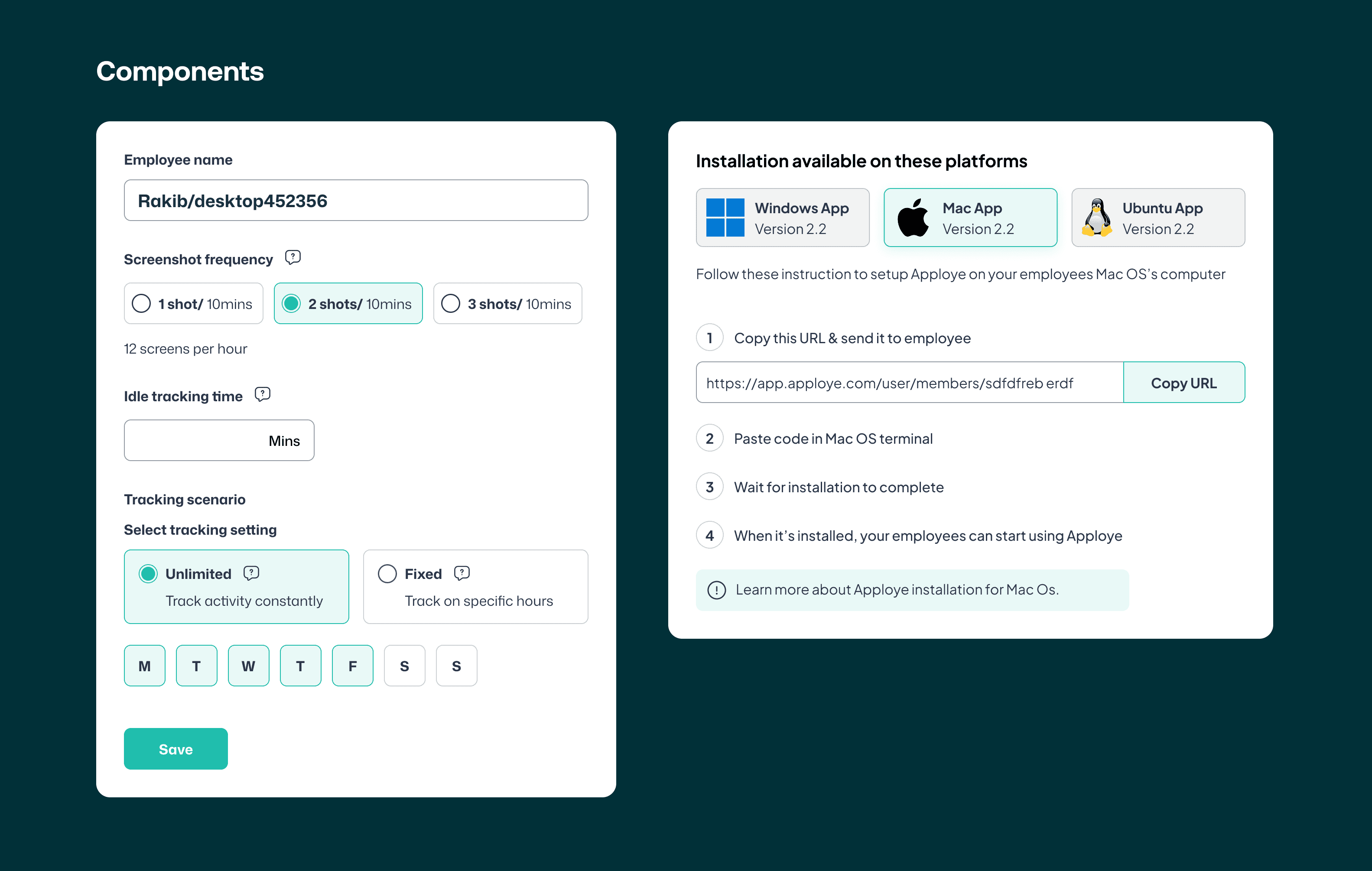
Stealth Mode Setup
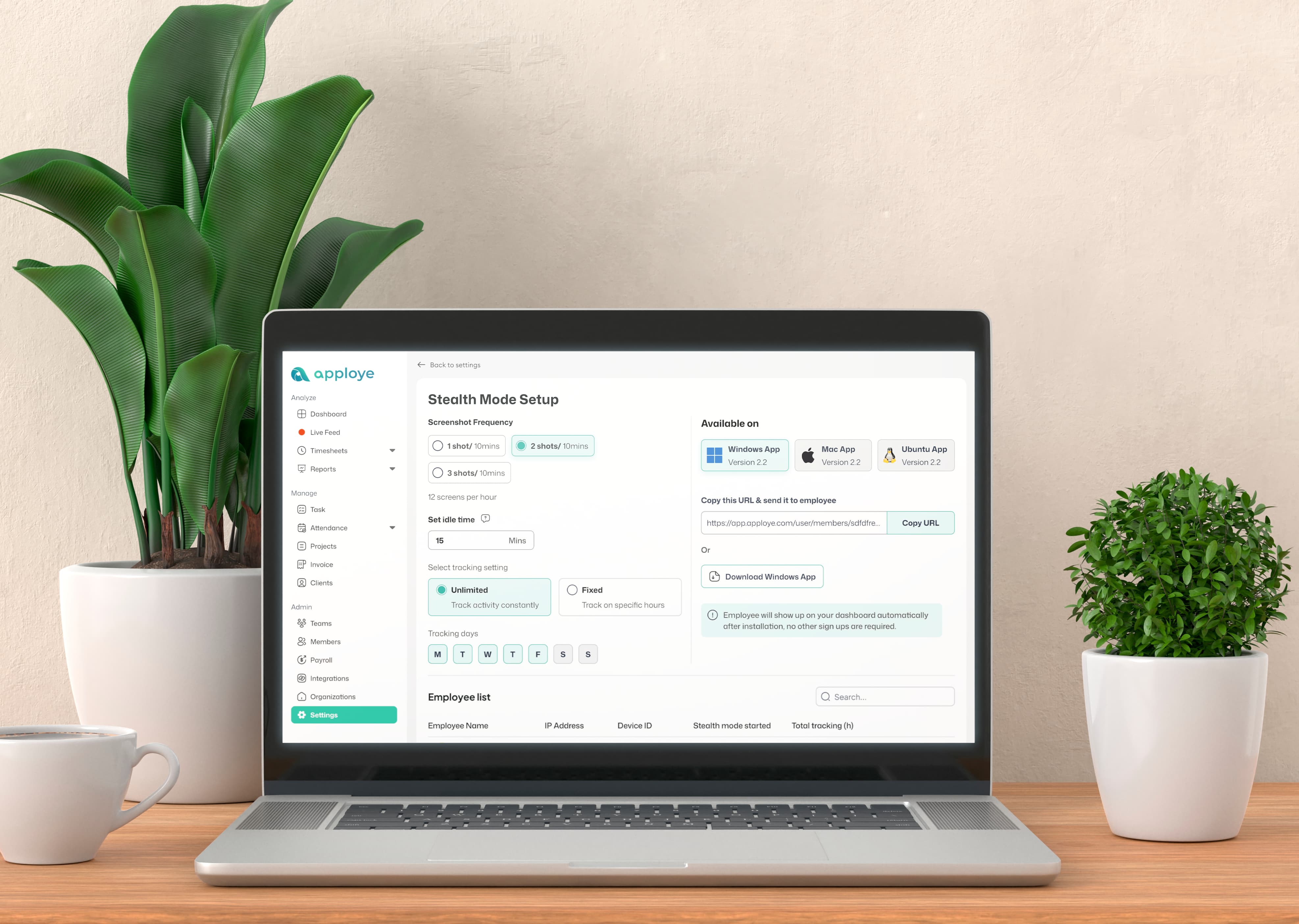
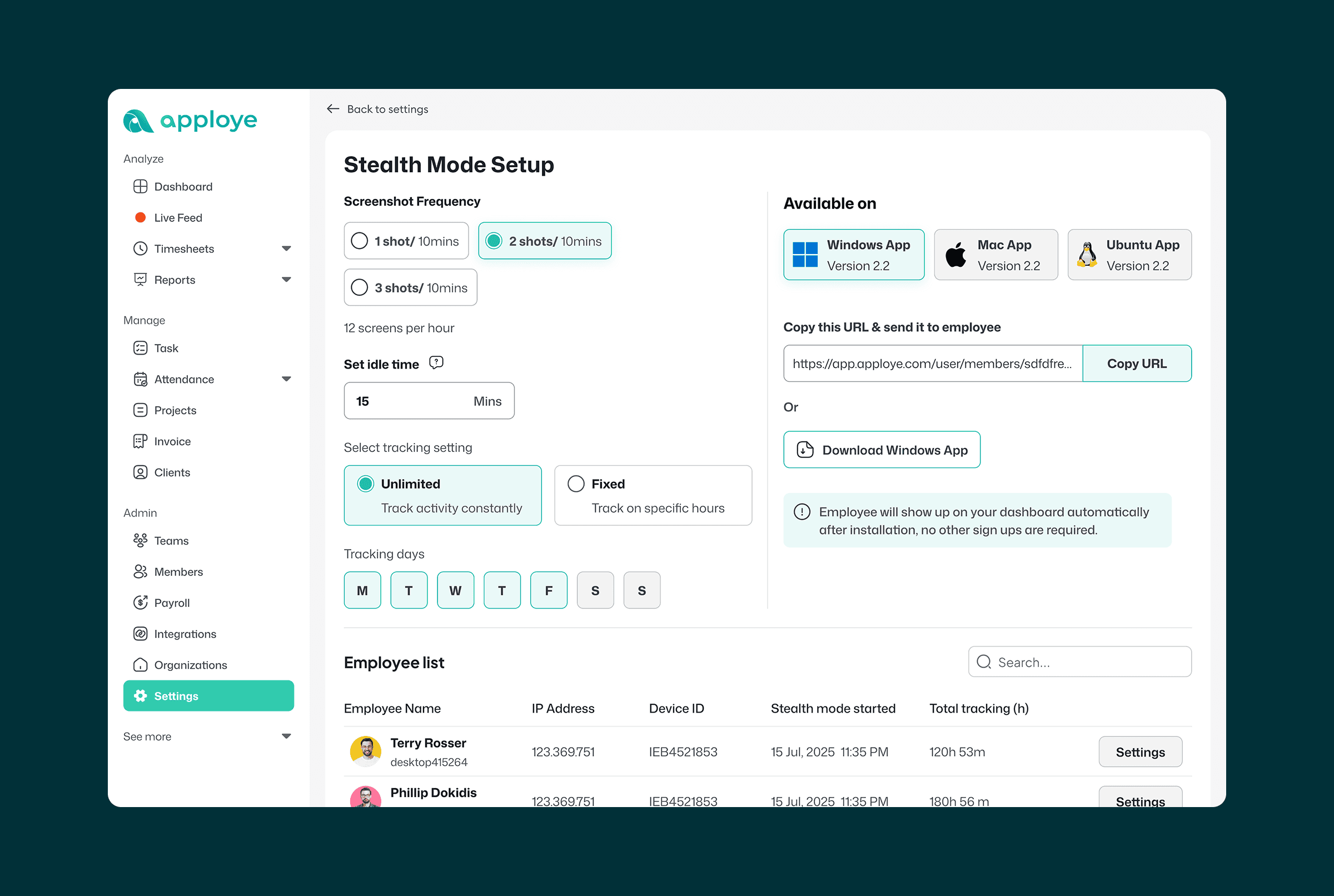
This screen allows organization owners to configure stealth settings. We offer various configuration options and application support for Windows, Mac, and Ubuntu.
I designed all components with usability, accessibility, and UX best practices in mind to ensure a seamless experience across platforms.
This screen allows organization owners to configure stealth settings. We offer various configuration options and application support for Windows, Mac, and Ubuntu.
I designed all components with usability, accessibility, and UX best practices in mind to ensure a seamless experience across platforms.



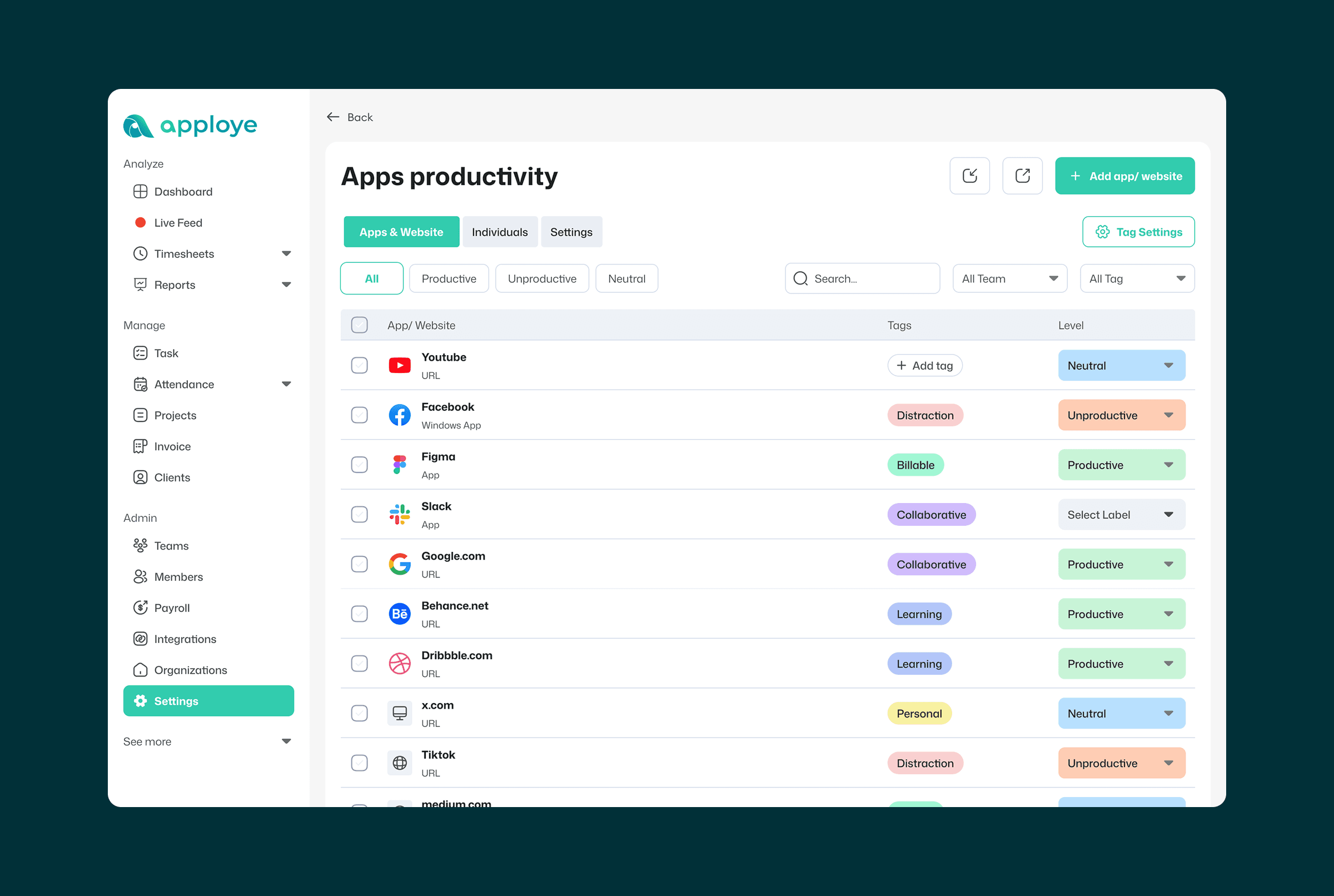
Apps Productivity Settings
This is where users define productivity classifications for apps and URLs, marking them as productive, unproductive, or neutral.
Users can also create custom tags to organize and categorize these apps and URLs based on their specific workflow needs.
This is where users define productivity classifications for apps and URLs, marking them as productive, unproductive, or neutral.
Users can also create custom tags to organize and categorize these apps and URLs based on their specific workflow needs.


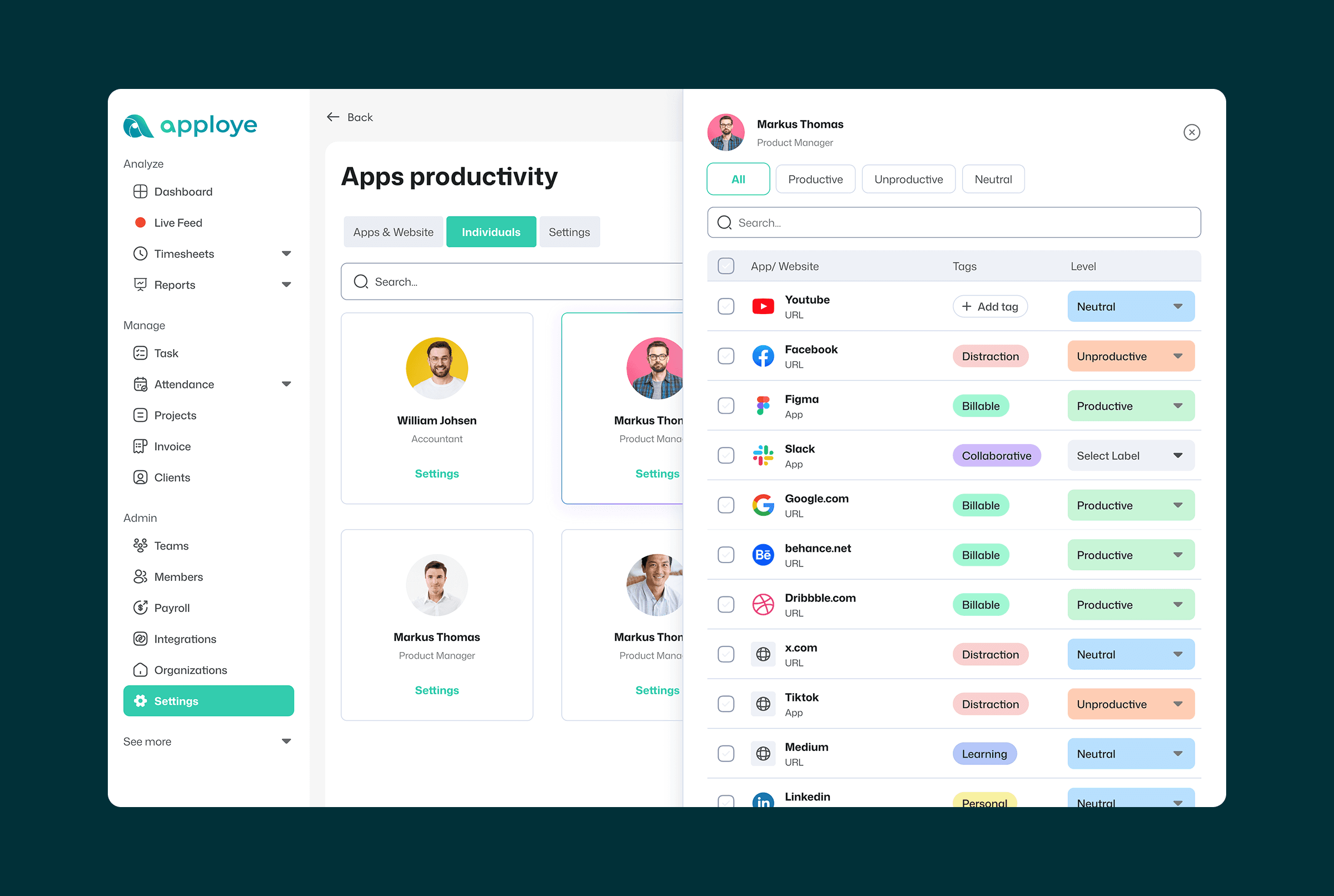
Personalized Productivity Mapping
User-Level Settings module allows organization owners to move beyond generic defaults and tailor productivity labels to specific roles or individuals.


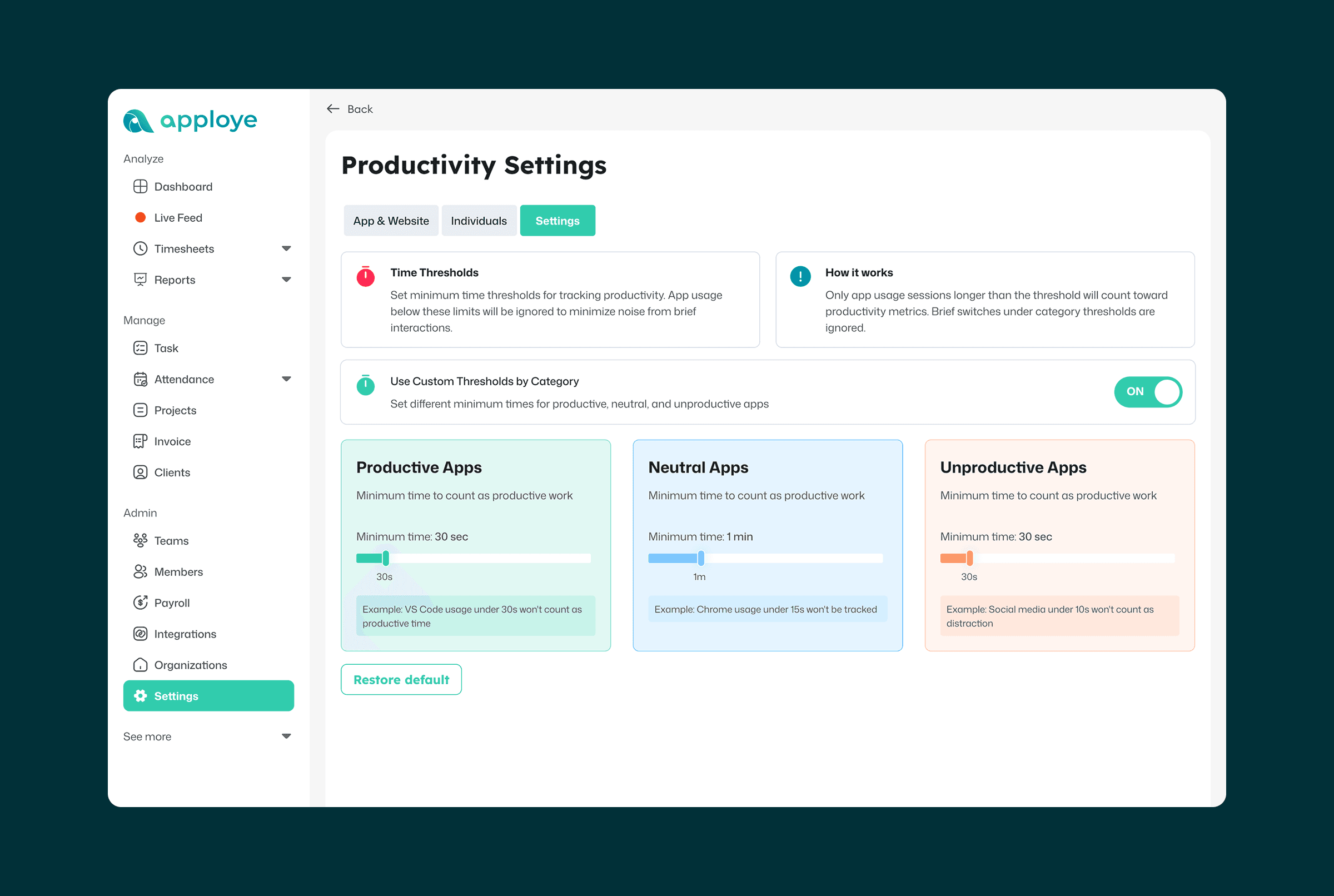
Dynamic Productivity Thresholds
To provide even more precision, We’ve designed a Customized Threshold setting. This allows organization owners to define exactly what constitutes productive time by setting time-based triggers for different app categories.
The Impact: This feature transforms Apploye from a basic tracking tool into a sophisticated productivity engine, giving owners the "levers" they need to generate highly accurate, custom-tailored reports.


Productivity Reports: Turning Data into Insight
The reporting module is where complex tracking data is transformed into actionable intelligence. My goal was to design a comprehensive view that allows organization owners to assess team performance at a glance.
Design Highlights:
Visual Data Clarity: I used clear, color-coded visualizations to distinguish between productive, unproductive, and neutral hours, reducing the cognitive load for managers scanning large datasets.
Flexible Data Slicing: To cater to different management styles, I implemented robust sorting and filtering options. This allows users to analyze performance from multiple angles, whether by individual, team, or specific timeframes.
Empowering Decision-Makers: By surfacing these patterns clearly, the report provides owners with a holistic view of workforce efficiency, helping them make informed, data-driven decisions.
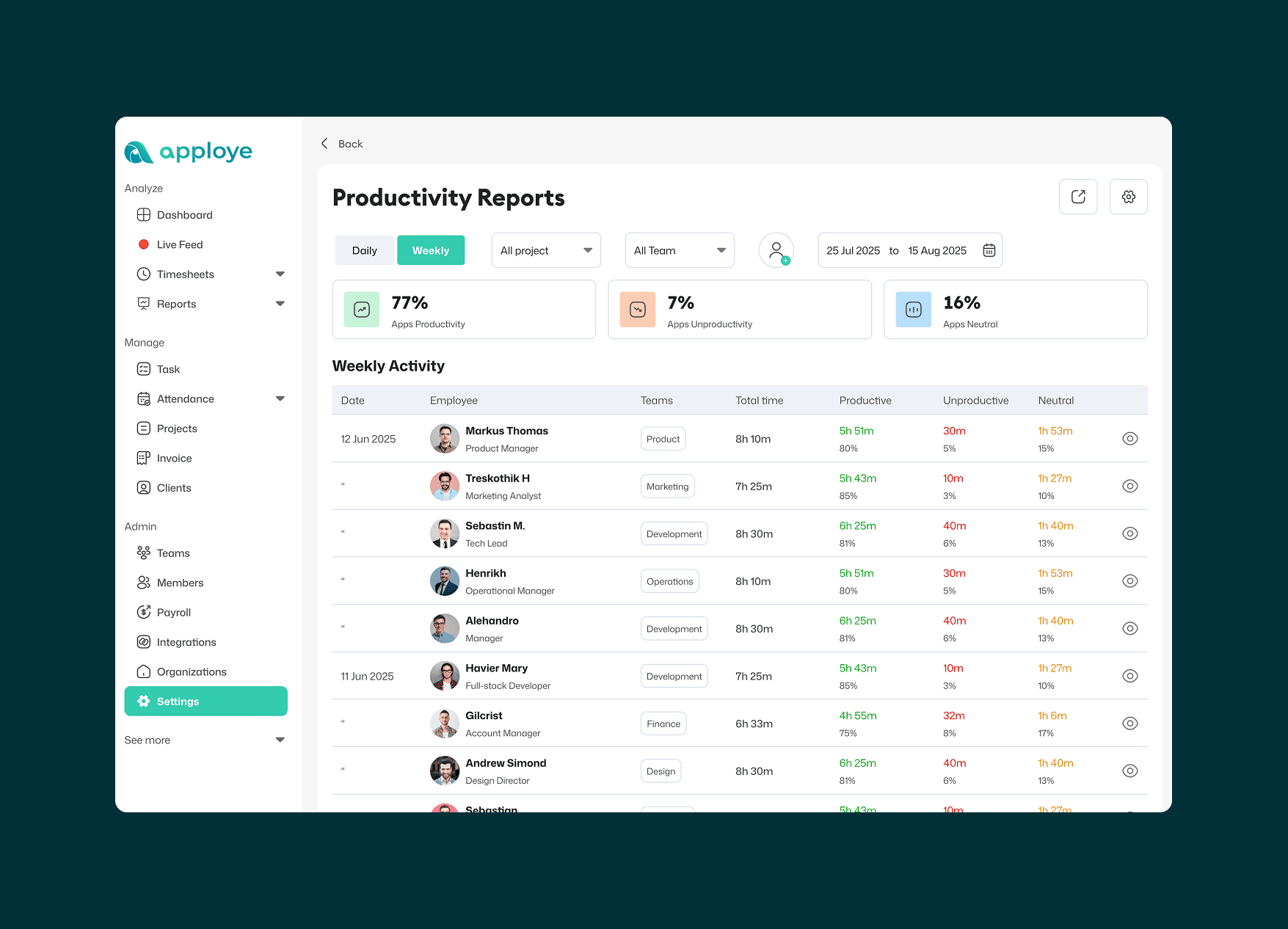
Visual Data Clarity: I used clear, color-coded visualizations to distinguish between productive, unproductive, and neutral hours, reducing the cognitive load for managers scanning large datasets.
Flexible Data Slicing: To cater to different management styles, I implemented robust sorting and filtering options. This allows users to analyze performance from multiple angles, whether by individual, team, or specific timeframes.
Empowering Decision-Makers: By surfacing these patterns clearly, the report provides owners with a holistic view of workforce efficiency, helping them make informed, data-driven decisions.


Visual Accountability: Contextual Screenshots
To provide a complete picture of the workday, I designed a Screenshot Monitoring module. This feature bridges the gap between raw data and real-world activity, giving owners the visual context they need to validate productivity scores.
Key Design Elements:
Data Integration: Each screenshot is timestamped and mapped directly to a productivity score, allowing owners to see exactly what was happening during "productive" vs. "unproductive" blocks.
Streamlined Review: I focused on a gallery-style layout that allows for quick scanning, so owners can get an accurate idea of employee output without spending hours reviewing individual images.
Balanced Oversight: By clearly displaying the time and productivity level alongside the visual, the design ensures that oversight is data-backed and objective.
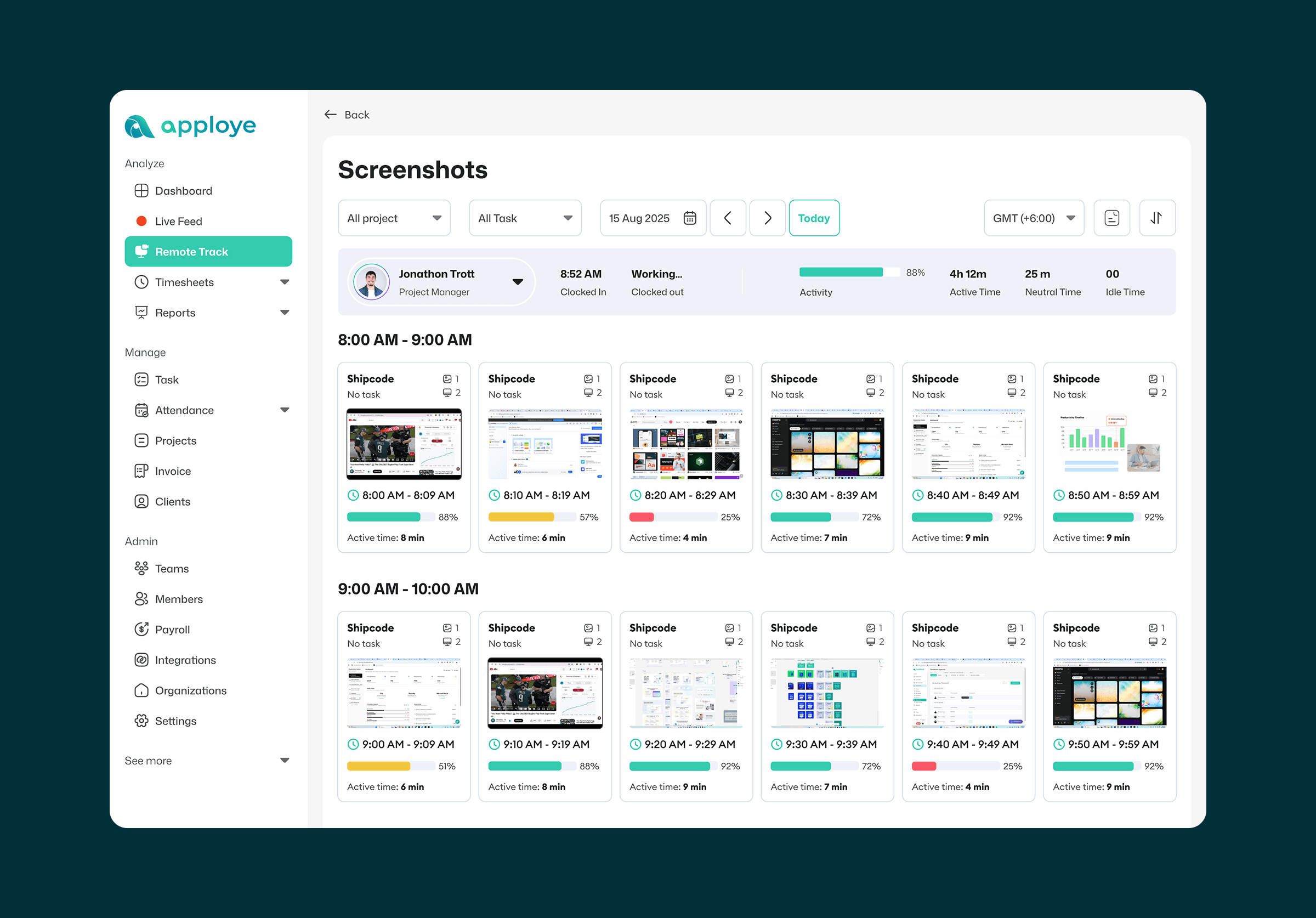
Data Integration: Each screenshot is timestamped and mapped directly to a productivity score, allowing owners to see exactly what was happening during "productive" vs. "unproductive" blocks.
Streamlined Review: I focused on a gallery-style layout that allows for quick scanning, so owners can get an accurate idea of employee output without spending hours reviewing individual images.
Balanced Oversight: By clearly displaying the time and productivity level alongside the visual, the design ensures that oversight is data-backed and objective.


Validation through Guerrilla Testing
Since traditional user testing wasn't feasible within our launch window, I conducted Internal Proxy Testing to validate the interface. I recruited colleagues from non-technical departments who were not involved with the Apploye project to ensure unbiased feedback.
The Testing Goal: To observe how "fresh eyes" interacted with the dashboard and identify any friction points in the navigation or data visualization.
Key Outcomes:
Identifying Friction: Testing with non-tech teammates revealed small but critical navigation hurdles that we had overlooked as "expert" users.
Data-Driven Refinements: The feedback allowed us to simplify complex labels and adjust the layout for better clarity before the final handoff.
Validating Intuition: Seeing non-aligned users successfully complete tasks gave the team the confidence needed to move forward with the MVP.

Identifying Friction: Testing with non-tech teammates revealed small but critical navigation hurdles that we had overlooked as "expert" users.
Data-Driven Refinements: The feedback allowed us to simplify complex labels and adjust the layout for better clarity before the final handoff.
Validating Intuition: Seeing non-aligned users successfully complete tasks gave the team the confidence needed to move forward with the MVP.




Whenever testing revealed a moment of hesitation or a usability hurdle, I immediately stepped back to the drawing board. I viewed every point of friction as an opportunity to refine the logic rather than a setback. This led to a series of back-and-forth iterations, where I rigorously tweaked layouts and simplified interactions until the flow felt truly intuitive and met my standard for a seamless user experience.
Implementation & Developer Handoff
The design process doesn't end at the handoff. During the implementation phase, I remained fully embedded with the engineering team to ensure the final product matched the high-fidelity vision and maintained technical integrity.
How I Supported the Build:
Continuous Collaboration: I maintained an open loop of communication with the developers, participating in regular "back-and-forth" sessions to resolve edge cases and technical hurdles in real-time.
Design QA (Quality Assurance): I conducted meticulous reviews of the staging builds to ensure that spacing, typography, and interactions were "butter smooth" and consistent with the design system.
Pragmatic Problem Solving: When technical limitations arose, I worked closely with the devs to find creative workarounds that preserved the user experience without delaying the launch.

Continuous Collaboration: I maintained an open loop of communication with the developers, participating in regular "back-and-forth" sessions to resolve edge cases and technical hurdles in real-time.
Design QA (Quality Assurance): I conducted meticulous reviews of the staging builds to ensure that spacing, typography, and interactions were "butter smooth" and consistent with the design system.
Pragmatic Problem Solving: When technical limitations arose, I worked closely with the devs to find creative workarounds that preserved the user experience without delaying the launch.




Outcomes: This tight-knit collaboration ensured a successful, high-quality launch of the features, bridging the gap between design intent and functional reality.
The Result: Launch & Beyond
The Impact of Precision Tracking
The evolution of Apploye from a standard tracker to a sophisticated productivity engine has redefined how organization owners understand their teams. By shifting from "monitoring" to "intelligent insight," the final product offers a transparent, data-driven environment that balances business oversight with operational clarity.
The Outcomes:
Actionable Data Integrity: The introduction of personalized productivity mapping and time thresholds eliminated "false negatives," providing owners with 100% more accurate performance reports.
Reduced Administrative Friction: Through the "settings customization" module, we transformed complex backend logic into an intuitive UI, allowing admins to manage large teams without manual overhead.
Future-Ready Architecture: By leveraging AI-augmented IA and building a scalable Component Library, we established a framework that allows for rapid feature expansion without compromising the user experience.
Actionable Data Integrity: The introduction of personalized productivity mapping and time thresholds eliminated "false negatives," providing owners with 100% more accurate performance reports.
Reduced Administrative Friction: Through the "settings customization" module, we transformed complex backend logic into an intuitive UI, allowing admins to manage large teams without manual overhead.
Future-Ready Architecture: By leveraging AI-augmented IA and building a scalable Component Library, we established a framework that allows for rapid feature expansion without compromising the user experience.


Lessons Learned:
Resourceful Validation: I learned that "Guerrilla Testing" with non-technical colleagues is an invaluable proxy when real-user access is limited, uncovering "expert blindness" and refining the flow before launch.
Designing for Context: This project taught me that productivity is subjective. Designing "levers" (thresholds and custom labels) taught me to build flexibility into the heart of the product rather than forcing a one-size-fits-all solution.
The Bridge to Engineering: Being fully engaged during the implementation phase reinforced that a design is only as good as its execution. Meticulous Design QA ensured the final build was "butter smooth" and technically sound.
Resourceful Validation: I learned that "Guerrilla Testing" with non-technical colleagues is an invaluable proxy when real-user access is limited, uncovering "expert blindness" and refining the flow before launch.
Designing for Context: This project taught me that productivity is subjective. Designing "levers" (thresholds and custom labels) taught me to build flexibility into the heart of the product rather than forcing a one-size-fits-all solution.
The Bridge to Engineering: Being fully engaged during the implementation phase reinforced that a design is only as good as its execution. Meticulous Design QA ensured the final build was "butter smooth" and technically sound.
Resourceful Validation: I learned that "Guerrilla Testing" with non-technical colleagues is an invaluable proxy when real-user access is limited, uncovering "expert blindness" and refining the flow before launch.
Designing for Context: This project taught me that productivity is subjective. Designing "levers" (thresholds and custom labels) taught me to build flexibility into the heart of the product rather than forcing a one-size-fits-all solution.
The Bridge to Engineering: Being fully engaged during the implementation phase reinforced that a design is only as good as its execution. Meticulous Design QA ensured the final build was "butter smooth" and technically sound.
Thanks for Watching


See More Case Studies